网络_虚拟局域网

产品

Happyn:基于 N2N 的安全、易于使用的虚拟专用网络(VPN)解决方案。客户端已开源。

方案及安全性分析

方案 1|Teleport(自建,合规最强)— 推荐

适用:团队多人、要审计/审批、要零暴露。
优点:

  • 节点与 A 服务器只出站到 Teleport Proxy;外部无法直连。
  • 登录用 临时 SSH 证书(几分钟/几小时自动过期),支持 SSO/MFA。
  • 会话审计(命令、TTY、录屏)、按角色/标签授权、Just-in-Time 申请。
    注意:自建 1~2 台 Proxy+Auth 做 HA;落地需要接公司 SSO/日志。

10 分钟 PoC 路线

  1. 起一台公开 Proxy(可云上),安装 teleport(开箱全免费功能够用)。
  2. 在 A 上装 teleport agent,用一次性 token 出站注册到 Proxy。
  3. 你本机 tsh login(走 SSO/MFA)→ tsh ssh A 直连;在 Web 控制台能看到会话记录。

方案 2|Headscale/Netmaker(WireGuard 专网)+ OpenSSH 证书(全自建、轻量)

适用:不引入 SaaS,又想快速可控;审计要求适中。
做法:

  • 用 Headscale/Netmaker 给所有人机/服务器一个私网(不暴露公网端口)。
  • 服务端 OpenSSH 信任公司 SSH CA(TrustedUserCAKeys),给运维颁发短期用户证书(建议用 Smallstep step-ca 自动签发/轮换)。
    优点:简单、性能好、完全私有化。
    不足:审计/审批需要自建(集中化命令审计可用 tlog/auditd + 日志平台)。

方案 3|托管最快(允许第三方时)

  • Cloudflare Access for SSH:A 只跑 cloudflared 出站连边缘;基于 SSO/MFA 的短期证书,审计完善,上线最快。
  • Tailscale SSH:身份化 ACL、NAT 穿透强;但依赖 Tailscale 控制面(若要自建则改用方案 2 + OpenSSH 证书)。

选型快速判断

  • 强审计/审批、合规优先、零暴露 → Teleport(自建)。
  • 全自建、轻量可控 → Headscale/Netmaker + OpenSSH 证书。
  • 要立刻上线且允许第三方 → Cloudflare Access 或 Tailscale SSH。

不管选谁,都请做这些“底线配置”

  • 禁用密码登录:PasswordAuthentication no;必要时 PermitRootLogin no。
  • 只监听专网接口(wg0/tailscale0/lo),公网网卡防火墙封死 22。
  • 用短期凭证(Teleport/SSH 证书),配定期轮换与一键吊销。
  • 开启命令审计与集中日志;关键操作走 MFA + 审批。
  • 分环境隔离(prod/stage/dev 用不同 CA/网段/策略)。

物理防火墙

https://e.huawei.com/cn/products/security
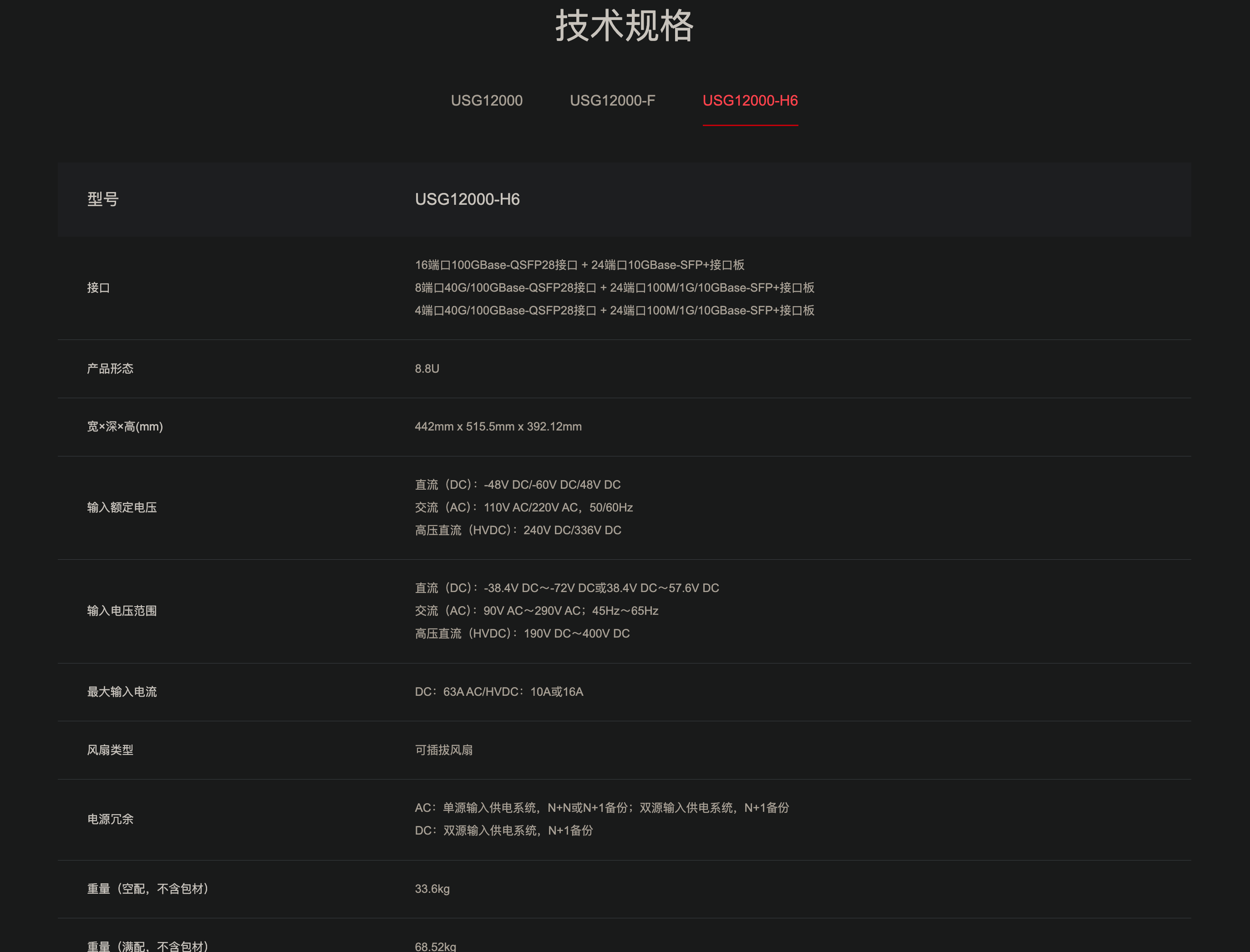
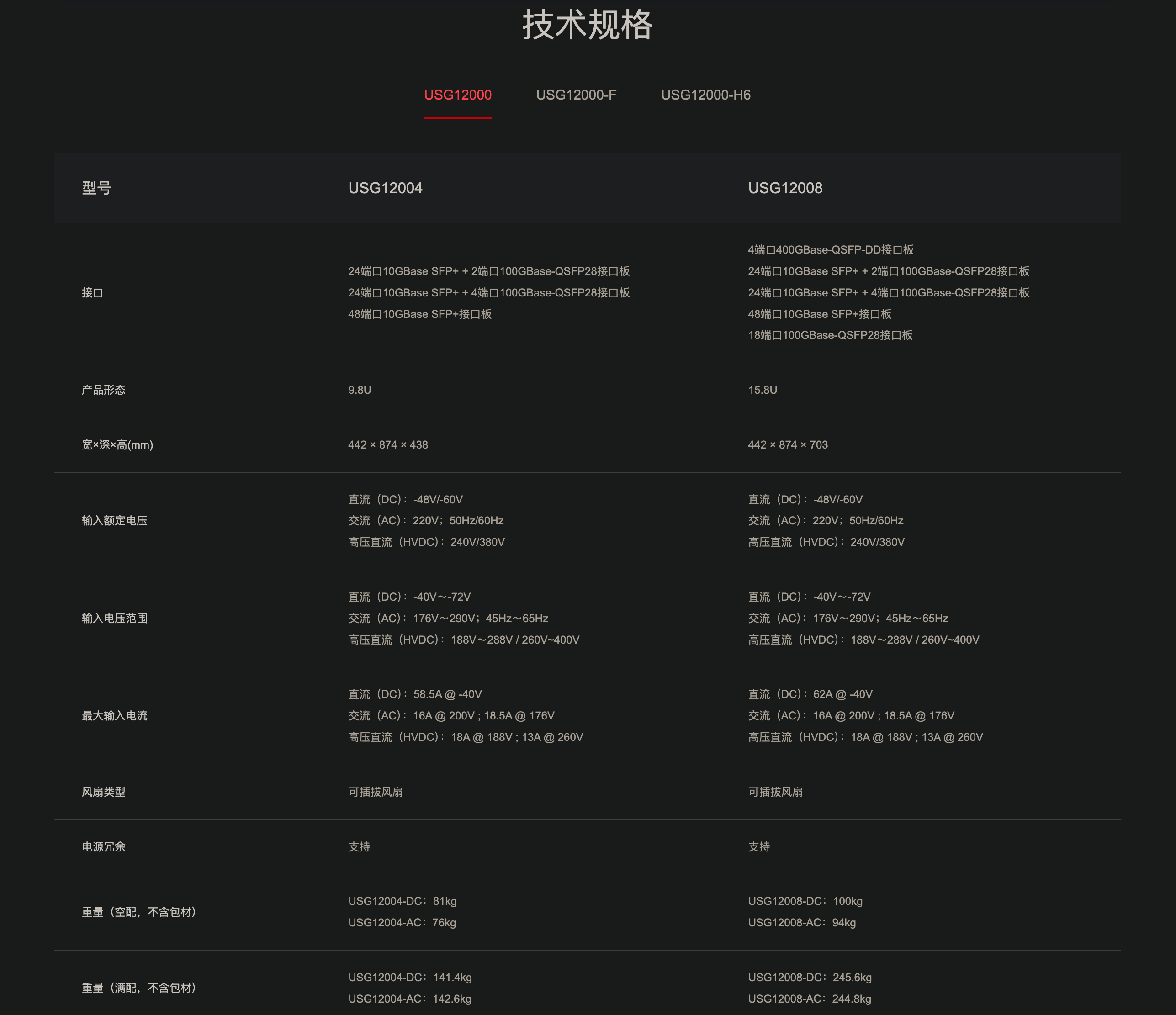
HiSecEngine USG12000 系列 AI 防火墙

HiSecEngine USG12000 系列防火墙(以下简称 USG12000 系列)是华为公司推出的首款T级AI防火墙,在网络边界实时防护已知与未知威胁,通常部署在云计算数据中心,大型企业及园区网出口,为数据中心、企业及园区网络提供领先的安全防护能力。USG12000系列采用先进的硬件架构设计,应用多种绿色节能创新技术,大幅降低设备能源消耗。提供全类型接口板,单槽位接口密度最高可达18x100GE,满足大流量需求。广泛应用于政府,金融,安平,教育,医疗,企业等行业。

提供高达T级的业务处理性能,集成NAT、CGN、VPN、虚拟化以及内容安全等多种安全特性,应对新时代大流量、多业务威胁防御场景。

具备完善的运营商级高可靠性架构和方案,支持双主控、双机热备、NSR、GR等多种可靠性机制。采用基于硬件的软件完整性校验,避免非法软件运行,打造安全基石。用户可以根据不同的网络需求进行灵活的选择。
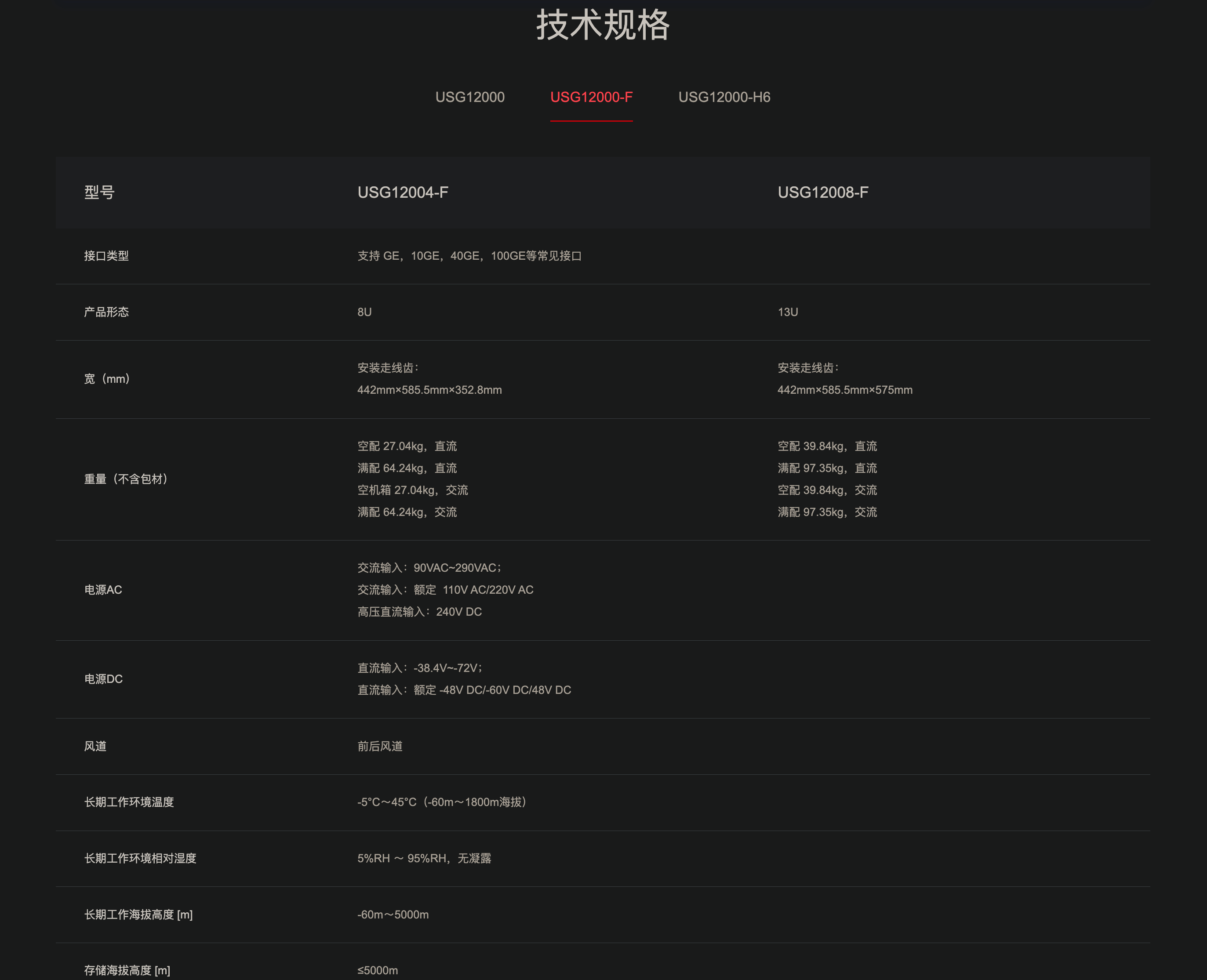
华为 HiSecEngine USG6700F 系列 AI 防火墙

是华为面向下一代数据中心推出的高性能万兆AI防火墙,通过全新软硬件架构,打造具备智能防御、卓越性能、极简运维三大关键能力的新一代AI防火墙,有效应对挑战。USG6700F系列使用智能技术赋能边界防御,精准阻断已知和未知威胁;内置多个安全专用加速引擎有效提升IPv4/IPv6转发、内容安全检测、IPSec等关键业务处理性能;通过安全运维平台实现防火墙、入侵防御、抗DDoS等多类安全产品的统一管理和运维,降低安全运维OPEX。


HiSecEngine USG6600F 系列 AI 防火墙

华为 HiSecEngine USG6600F 系列是华为面向下一代数据中心推出的万兆AI防火墙,HiSecEngine USG6600F系列基于最新软硬件平台,提供IPv4/IPv6共栈能力,业务性能大幅提升;使用智能技术有效检测高级威胁,增强边界防护能力。支持联动华为乾坤安全云服务,提供边界防护与响应服务,端云联动,立体防御。广泛适用于金融、政府、大企业等行业。

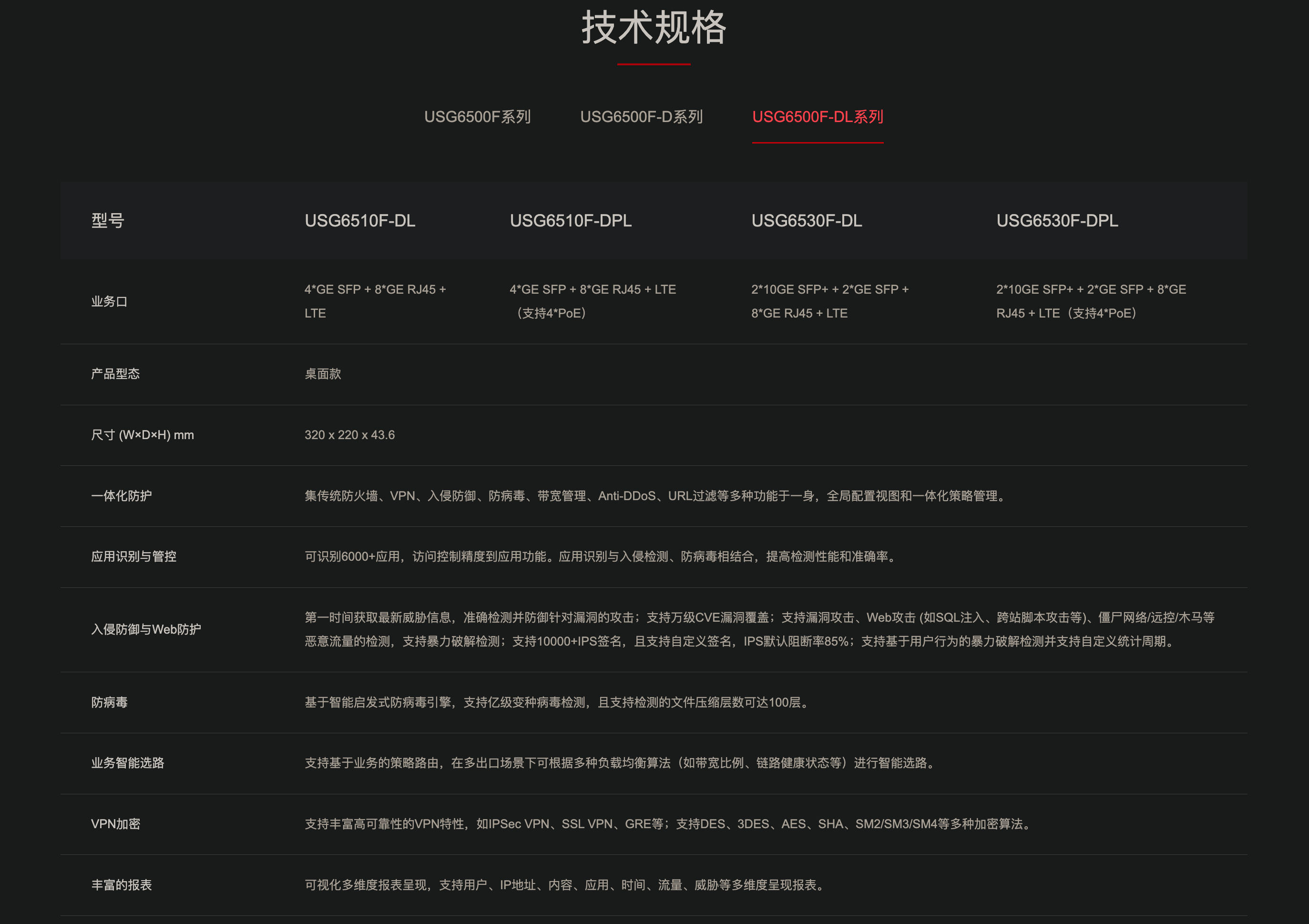
HiSecEngine USG6500F 系列 AI 防火墙

HiSecEngine USG6500F 系列 AI 防火墙是华为面向小型企业、行业分支、连锁商业机构设计开发的新一代AI防火墙,在提供NGFW能力的基础上,联动其他安全设备,增强边界检测能力,有效防御高级威胁。产品提供模式匹配以及加解密业务处理加速能力,使得防火墙处理内容安全检测、IPSec等业务的性能显著提升。支持联动华为乾坤安全云服务,提供边界防护与响应、漏洞扫描、日志审计等服务,端云联动,立体防御,广泛适用于教育、医疗、零售等行业。
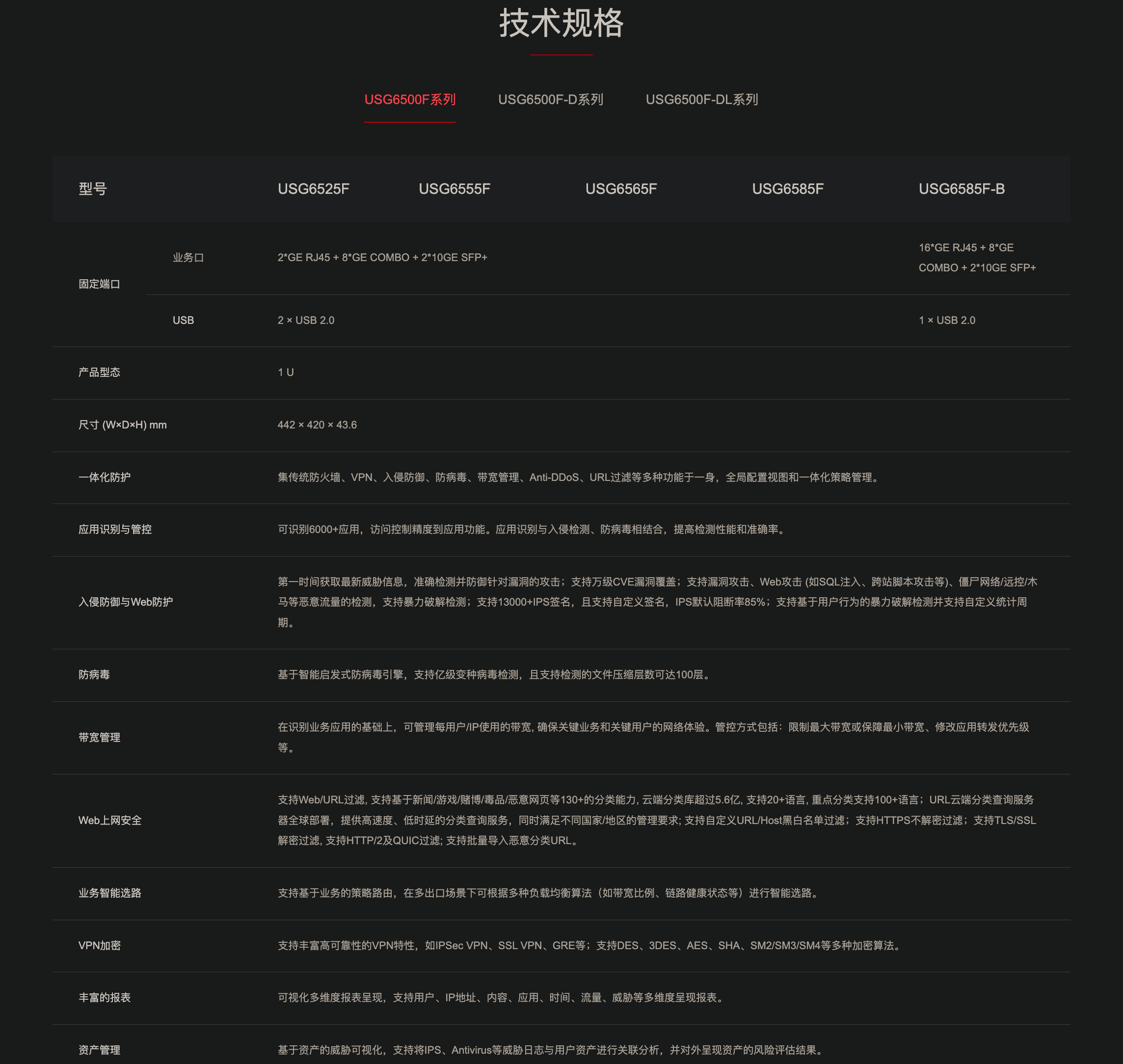
华为 HiSecEngine USG6000F-E 系列防火墙

HiSecEngine USG6000F-E系列防火墙是华为面向中小型企业和多分支机构推出的高性能防火墙,适用于各类场景和网络安全建设需求。通过全新软硬件平台来实现功能全面、高性能、低时延的智能防火墙。
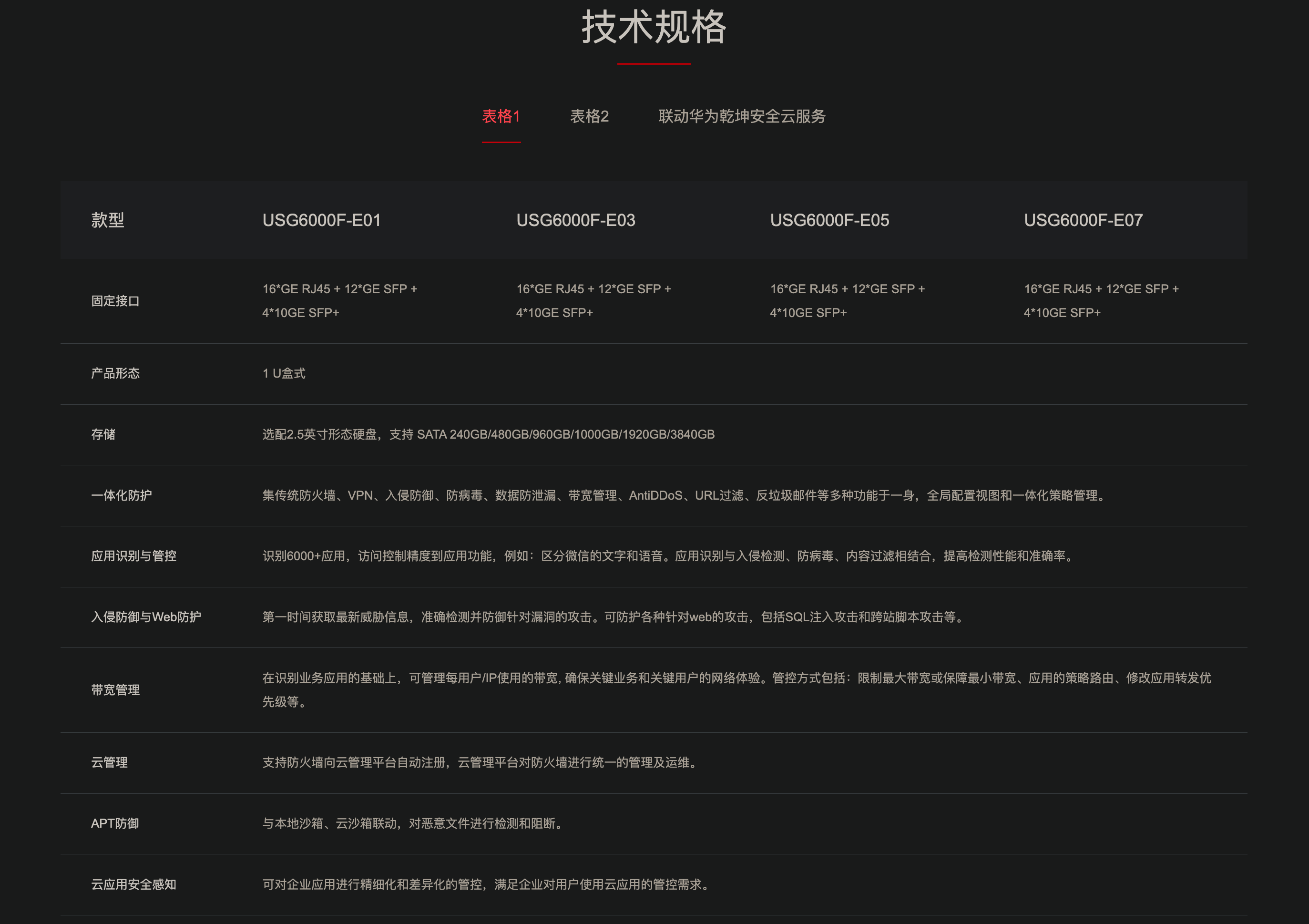
华为 HiSecEngine USG6700E 系列 AI 防火墙

华为HiSecEngine USG6700E系列AI防火墙(盒式)是面向下一代数据中心和和大型企业园区网推出的万兆AI防火墙,在提供NGFW能力的基础上,联动其他安全设备,主动防御网络威胁,增强边界检测能力,有效防御高级威胁,同时解决性能下降问题。NP引擎提供快速转发能力,防火墙性能显著提升。广泛适用于金融、政府、大企业等行业。
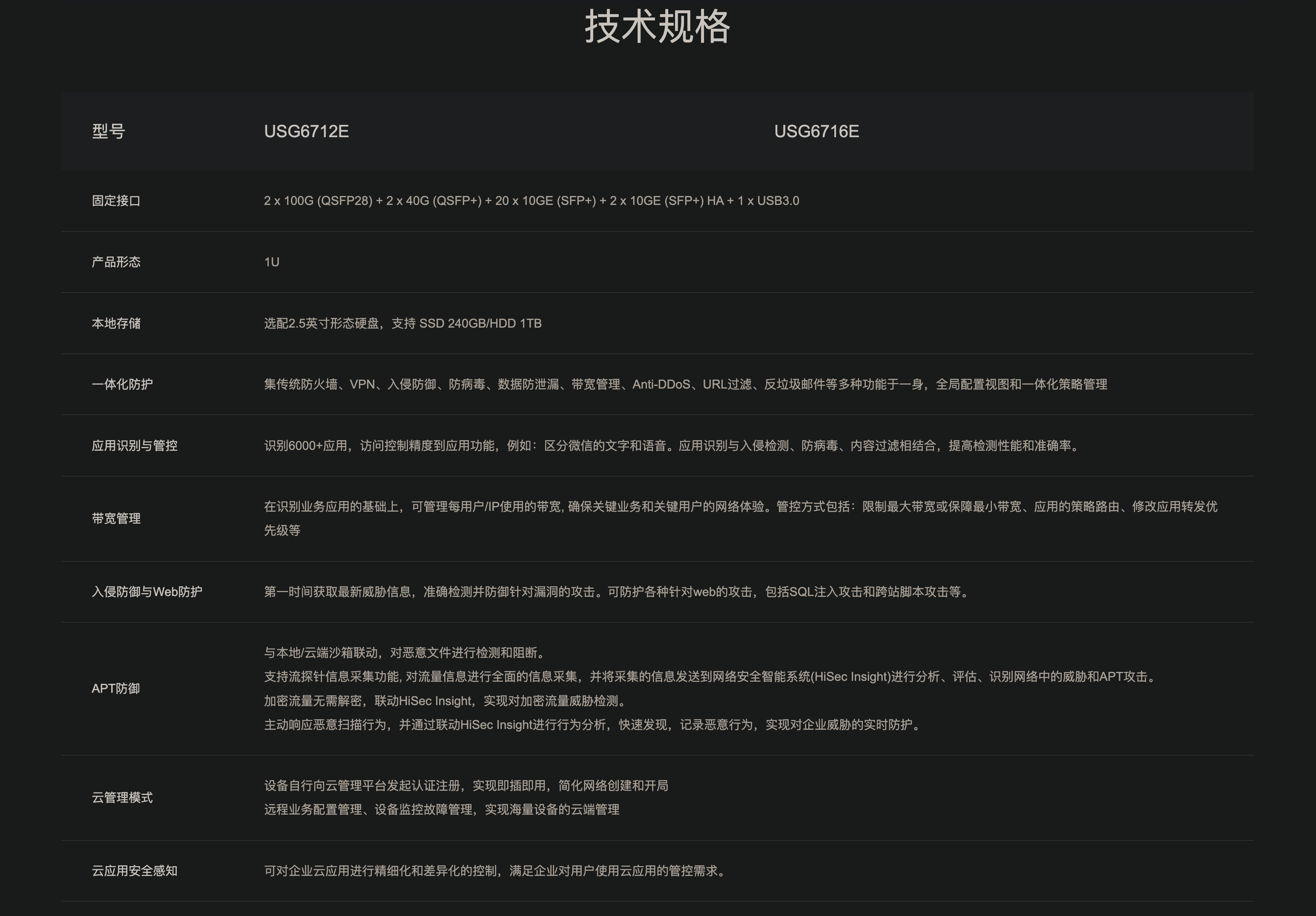
HiSecEngine USG6600E 系列 AI 防火墙

华为 HiSecEngine USG6600E 系列 AI 防火墙是面向下一代数据中心推出的万兆AI防火墙,在提供NGFW能力的基础上,联动其他安全设备,主动防御网络威胁,增强边界检测能力,有效防御高级威胁,同时解决性能下降问题。NP提供快速转发能力,防火墙性能显著提升。广泛适用于金融、政府、大企业等行业。

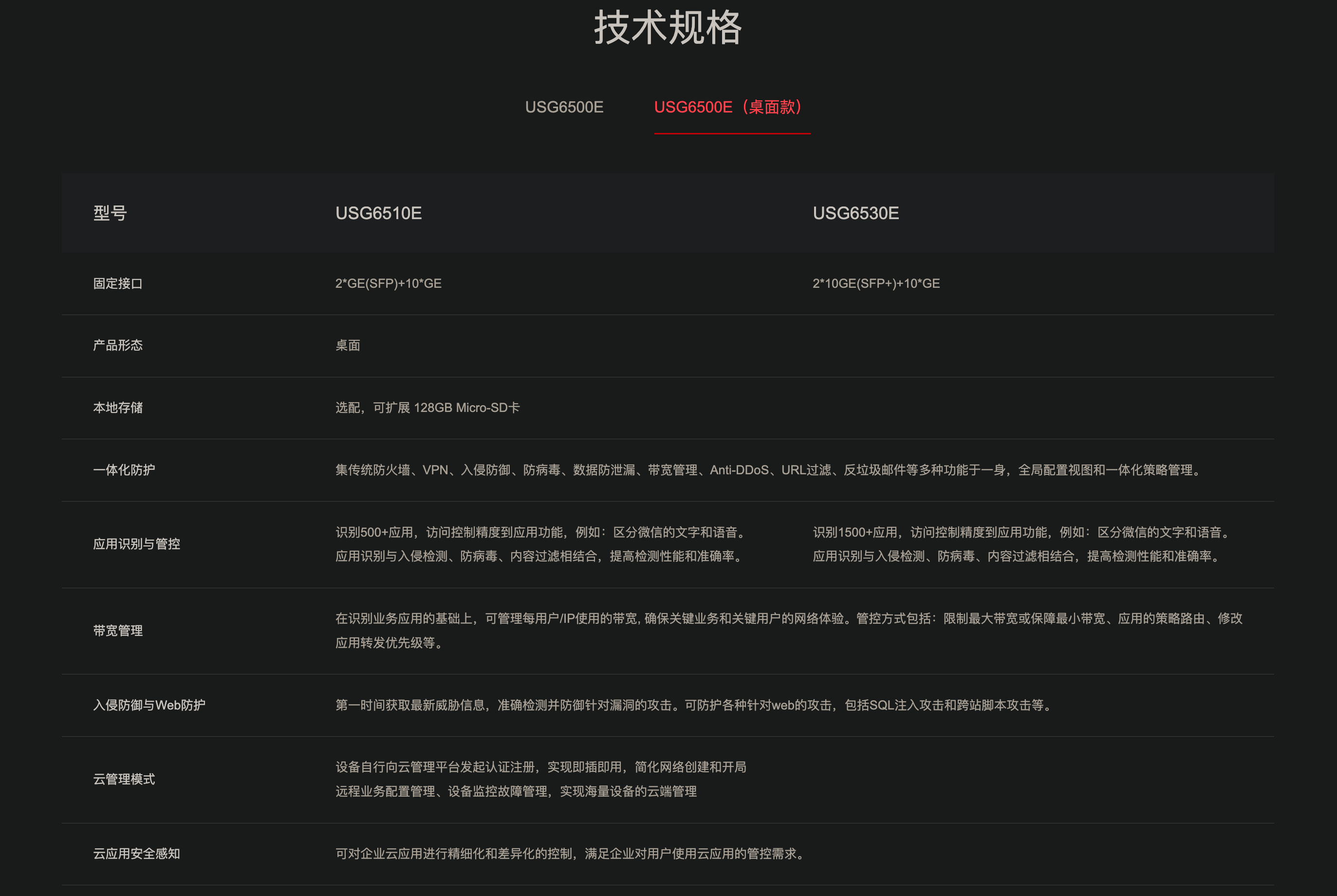
HiSecEngine USG6500E 系列 AI 防火墙

华为 HiSecEngine USG6500E 系列 AI 防火墙是面向中小企业和连锁机构推出的企业级AI防火墙,在提供NGFW能力的基础上,联动其他安全设备,主动积极防御网络威胁,增强边界检测能力,有效防御高级威胁,同时解决性能下降问题。产品提供模式匹配以及加解密业务处理加速能力,使得防火墙处理内容安全检测、IPSec等业务的性能显著提升。支持联动华为乾坤安全云服务,提供边界防护与响应、漏洞扫描、日志审计等服务,端云联动,立体防御。广泛适用于教育、医疗、零售等行业。
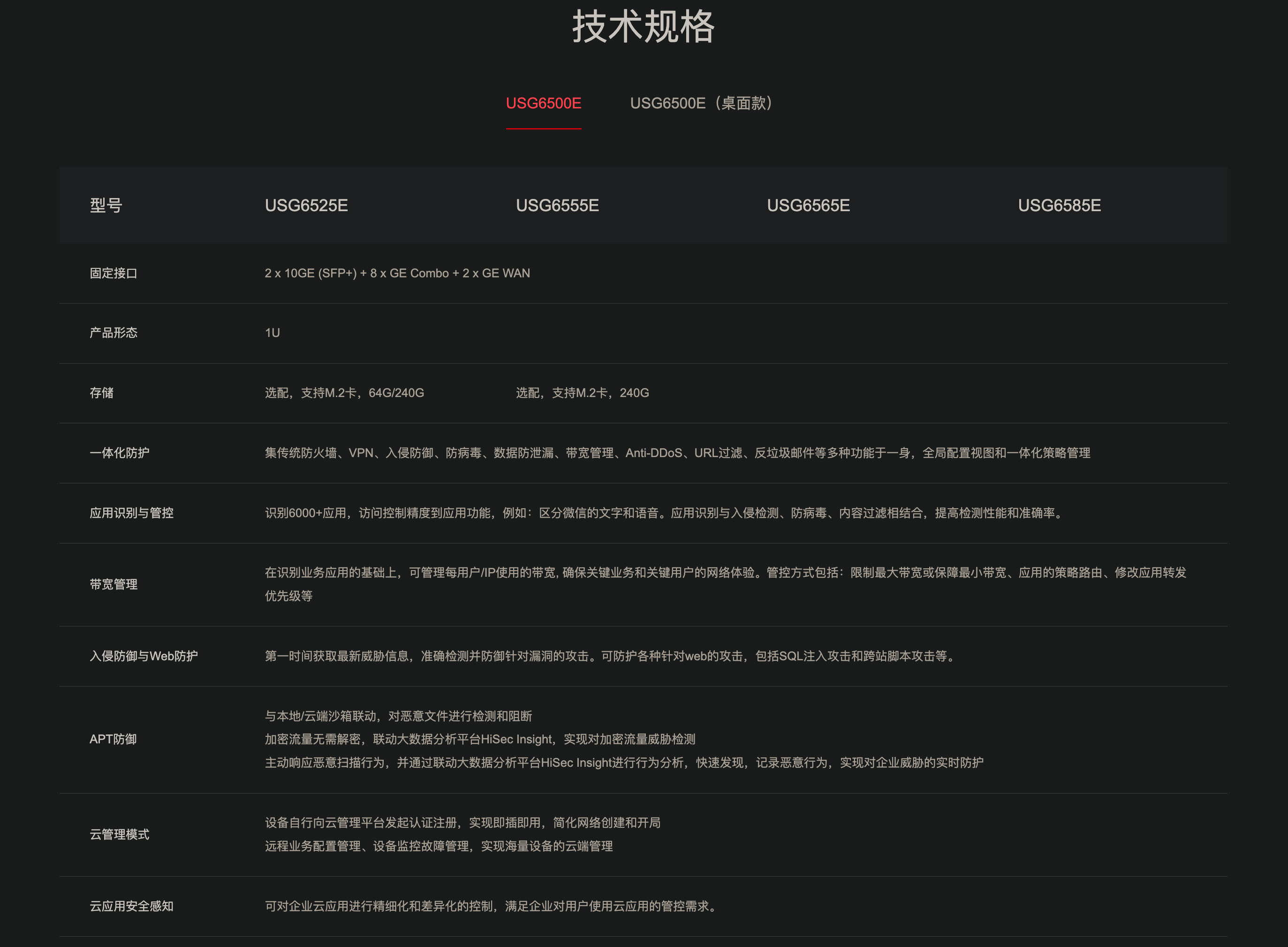
桌面款
Tailscale 和 Headscale

Tailscale 是基于 WireGuard 的虚拟组网工具。提供免费、收费的托管控制服务。

Headscale 是 Tailescale 控制服务器的开源、自托管实现。

Podman

Podman 相比 Docker 的好处是,Podman可以经由管理员的权限下放让普通用户也可以操作容器,在服务器上跑容器映射的实验。

自检命令(不需要管理员权限):

1
2
3
podman info --debug | sed -n '1,120p'
id
grep -E "^$(whoami):" /etc/subuid /etc/subgid 2>/dev/null
  • podman info 里如果显示 rootless 正常、存储/网络组件齐全,基本就能开干。
  • 如果 /etc/subuid / /etc/subgid 没你的条目,很多情况下会导致功能受限或直接失败,这就需要管理员加。
1
2
3
4
5
6
7
8
9
10
11
12
13
14
15
16
17
18
19
20
21
22
23
24
25
26
27
28
29
30
31
32
33
34
35
36
37
38
39
40
41
42
43
44
45
46
47
48
49
50
51
52
53
54
55
56
57
58
59
60
61
62
63
64
65
66
67
68
69
70
71
72
73
74
75
76
77
78
79
80
81
82
83
84
85
86
87
88
89
90
91
92
93
94
95
96
97
98
99
100
101
102
103
104
105
106
107
108
109
110
111
112
113
114
115
116
117
118
119
120
host:
arch: amd64
buildahVersion: 1.39.4
cgroupControllers:
- memory
- pids
cgroupManager: systemd
cgroupVersion: v2
conmon:
package: conmon-2.1.12-1.el9.x86_64
path: /usr/bin/conmon
version: 'conmon version 2.1.12, commit: 5859d6167f22954414ce804d3f2ae9cf6208f929'
cpuUtilization:
idlePercent: 95.1
systemPercent: 0.75
userPercent: 4.15
cpus: 512
databaseBackend: sqlite
distribution:
distribution: rocky
version: "9.6"
eventLogger: file
freeLocks: 2048
hostname: turing001
idMappings:
gidmap:
- container_id: 0
host_id: 1013
size: 1
- container_id: 1
host_id: 951968
size: 65536
uidmap:
- container_id: 0
host_id: 1013
size: 1
- container_id: 1
host_id: 951968
size: 65536
kernel: 5.14.0-570.55.1.el9_6.x86_64
linkmode: dynamic
logDriver: k8s-file
memFree: 198968160256
memTotal: 2434049519616
networkBackend: netavark
networkBackendInfo:
backend: netavark
dns:
package: aardvark-dns-1.14.0-1.el9.x86_64
path: /usr/libexec/podman/aardvark-dns
version: aardvark-dns 1.14.0
package: netavark-1.14.1-1.el9_6.x86_64
path: /usr/libexec/podman/netavark
version: netavark 1.14.1
ociRuntime:
name: crun
package: crun-1.23.1-2.el9_6.x86_64
path: /usr/bin/crun
version: |-
crun version 1.23.1
commit: d20b23dba05e822b93b82f2f34fd5dada433e0c2
rundir: /tmp/cxing-runtime/crun
spec: 1.0.0
+SYSTEMD +SELINUX +APPARMOR +CAP +SECCOMP +EBPF +CRIU +YAJL
os: linux
pasta:
executable: /usr/bin/pasta
package: passt-0^20250217.ga1e48a0-10.el9_6.x86_64
version: ""
remoteSocket:
exists: true
path: /tmp/cxing-runtime/podman/podman.sock
rootlessNetworkCmd: pasta
security:
apparmorEnabled: false
capabilities: CAP_CHOWN,CAP_DAC_OVERRIDE,CAP_FOWNER,CAP_FSETID,CAP_KILL,CAP_NET_BIND_SERVICE,CAP_SETFCAP,CAP_SETGID,CAP_SETPCAP,CAP_SETUID,CAP_SYS_CHROOT
rootless: true
seccompEnabled: true
seccompProfilePath: /usr/share/containers/seccomp.json
selinuxEnabled: true
serviceIsRemote: false
slirp4netns:
executable: /usr/bin/slirp4netns
package: slirp4netns-1.3.2-1.el9.x86_64
version: |-
slirp4netns version 1.3.2
commit: 0f13345bcef588d2bb70d662d41e92ee8a816d85
libslirp: 4.4.0
SLIRP_CONFIG_VERSION_MAX: 3
libseccomp: 2.5.2
swapFree: 0
swapTotal: 0
uptime: 1104h 28m 50.00s (Approximately 46.00 days)
variant: ""
plugins:
authorization: null
log:
- k8s-file
- none
- passthrough
- journald
network:
- bridge
- macvlan
- ipvlan
volume:
- local
registries:
search:
- registry.access.redhat.com
- registry.redhat.io
- docker.io
store:
configFile: /home/cxing/.config/containers/storage.conf
containerStore:
number: 0
paused: 0
running: 0
stopped: 0
graphDriverName: overlay

以上的信息说明:

  • security.rootless: true ✅(你现在就是以普通用户在用 Podman)
  • idMappings 里有一段 65536 的 uid/gid 映射 ✅(说明 subuid/subgid 也配了,rootless 功能比较完整)
  • cgroupVersion: v2 + cgroupManager: systemd ✅(资源隔离走 systemd/cgroup v2)
  • networkBackend: netavark 且 rootlessNetworkCmd: pasta ✅(rootless 网络也能用)

需要注意的几个“普通用户限制点”

  • cgroupControllers 只有 memory 和 pids(没有 cpu)。所以像 --cpus、CPU quota 这类参数可能不生效或会报错;内存/进程数限制一般是可用的。
  • SELinux 开着(selinuxEnabled: true)。挂载宿主机目录时,常见要加 :Z:
    podman run --rm -it -v "$PWD:/work:Z" ubuntu:22.04 bash
  • 端口映射一般能用 -p,但 <1024 的端口在 rootless 下通常不行(除非管理员改过系统策略)。

常用基础命令

临时起一个交互容器做实验(推荐)

1
podman run --rm -it ubuntu:22.04 bash

进已经在跑的容器

1
2
podman ps
podman exec -it <容器名或ID> bash

用 Podman 在服务器上部署 Headscale

准备目录

1
2
mkdir -p ~/headscale/{config,lib,run}
cd ~/headscale

下载对应版本的示例配置:

1
2
3
curl -fsSL \
https://raw.githubusercontent.com/juanfont/headscale/v0.27.1/config-example.yaml \
-o ~/headscale/config/config.yaml

Headscale 配置文件

示例配置里包含 server_url、listen_addr、数据库路径、dns.base_domain 等关键项。
用你熟悉的编辑器改(例如 vim ~/headscale/config/config.yaml),至少改这几处:

  • server_url: 改成你客户端要连的地址(推荐 HTTPS 域名)
  • listen_addr: 容器里建议用 0.0.0.0:8080(否则只监听 127.0.0.1,端口映射进不去)
  • dns.base_domain: 改成你的 MagicDNS 域名(注意示例里强调要和 server_url 域名不同)
    • dns.base_domain 不是 headscale 服务器的公网域名(那个是 server_url),它是给 MagicDNS 用的“内网后缀域名”:开启 MagicDNS 后,你 tailnet 里的每台设备都会有一个形如laptop.tailnet.example.com 这样的名字来互相访问。
    • 最常见写法:tailnet.<主域名>
    • 如果想要用主机名互访,必须配这个和MagicDNS,而且客户端在启动时要--accept-dns=true。
  • SQLite 默认路径 database.sqlite.path: /var/lib/headscale/db.sqlite 保持即可(我们会把它映射到宿主机 ~/headscale/lib)。
  • headscale configtest 可以用来验证配置文件。

如果准备放到反代后面并让反代处理 TLS,也可以按文档把 tls_cert_path/tls_key_path 置空并确保 WebSocket 正常转发。

用 Podman 启动 Headscale 容器

1
2
3
4
5
6
7
8
9
10
podman pull ghcr.io/juanfont/headscale:v0.27.1

podman run -d --name headscale \
-v "$HOME/headscale/config:/etc/headscale:Z" \
-v "$HOME/headscale/lib:/var/lib/headscale:Z" \
-v "$HOME/headscale/run:/var/run/headscale:Z" \
-p 0.0.0.0:8080:8080 \
-p 127.0.0.1:9090:9090 \
--health-cmd "headscale health" \
ghcr.io/juanfont/headscale:v0.27.1 serve

说明:

  • :Z 是 Rocky/SELinux 环境常用的卷标处理(不加可能权限报错)。
  • 9090 是 metrics/debug 端口,我这里绑定到 127.0.0.1,避免公网暴露(容器文档也提到 8080/9090 的发布方式以及 0.0.0.0 vs 127.0.0.1 的差异)。

看日志确认启动:

podman logs -f headscale

检查是否能跑起来

1
2
3
podman ps
podman logs --tail=200 headscale
podman port headscale

pull到了什么地方?

对 rootless(普通用户)Podman 来说,podman pull 下来的镜像不会变成当前目录里的一个 .tar 文件,而是被写进 这个用户自己的本地镜像存储(image store) 里(按层存储、内容寻址)。

  • 持久化存储(镜像/层):$HOME/.local/share/containers/storage
  • 运行时临时目录(容器运行时文件):通常在 XDG_RUNTIME_DIR(常见是 /run/user/$UID;你机器上看起来可能被设到 /tmp/cxing-runtime/...)

podman info 里显示:

  • store.configFile: /home/cxing/.config/containers/storage.conf 说明实际路径可能被这个配置文件覆盖了。

直接查看“它到底下到哪里了”(最准)

podman info --format 'GraphRoot={{.Store.GraphRoot}}'
podman info --format 'RunRoot={{.Store.RunRoot}}'

想看镜像占了多少、有哪些

1
2
podman images
podman system df

-p 语法

Podman 的 -p 参数用于端口映射,语法格式如下:

1
podman run -p [主机IP:][主机端口:][容器端口] [容器名]

示例:将容器80端口映射到主机8080端口,只允许本机访问
当指定了IP地址后,意味着,特定了网络接口。

1
podman run -p 127.0.0.1:8080:80 nginx

范围映射:

1
podman run -p 2000-2005:1000-1005 镜像

Headscale 命令

创建用户:

1
podman exec -it headscale headscale users create cxing

生成preauth key:

1
podman exec -it headscale headscale preauthkeys create --user [ID] --reusable --expiration 24h

然后在客户端执行:

1
tailscale up --login-server http://你的headscale域名 --authkey 填上面生成的key

用 Quadlet 做开机自启(rootless)
Podman 的 Quadlet 支持把 .container 文件放到 ~/.config/containers/systemd/ (用户级)并由 systemd 生成 service 来管理。

创建文件:

1
2
mkdir -p ~/.config/containers/systemd
vim ~/.config/containers/systemd/headscale.container

填入(按需改版本/端口/路径)

1
2
3
4
5
6
7
8
9
10
11
12
[Container]
Image=ghcr.io/juanfont/headscale:v0.27.1
ContainerName=headscale
Exec=serve
PublishPort=0.0.0.0:8080:8080
PublishPort=127.0.0.1:9090:9090
Volume=%h/headscale/config:/etc/headscale:Z
Volume=%h/headscale/lib:/var/lib/headscale:Z
Volume=%h/headscale/run:/var/run/headscale:Z

[Install]
WantedBy=default.target

加载并启动:

1
2
3
systemctl --user daemon-reload
systemctl --user start headscale.service
systemctl --user enable headscale.service

反代 / 443 / Cloudflare 的关键提醒

  • 反向代理必须支持 WebSockets,否则 tailscale 客户端会注册/握手失败。
  • Cloudflare proxy / tunnel 官方明确说不支持且无法工作(Cloudflare 不支持 tailscale 协议所需的 WebSocket POST)。
  • rootless 用户默认绑不了 443:要么让管理员改系统参数/做端口转发,要么用一个 root 权限的反代(Nginx/Caddy)占 443 转到你 8080。

Tailscale 客户端安装

MacOS

在 macOS 上装 Tailscale,最稳的是装 官方 Standalone 版本(推荐),其次是 App Store 版本。官方要求 macOS 12.0 (Monterey) 或更高。

方式一:官方 Standalone(推荐)

  1. 去 Tailscale 的 macOS 安装页/下载页,下载 Standalone 安装包并安装(通常是 .pkg)。
  2. 打开 Tailscale.app(菜单栏会出现 Tailscale 图标),按引导完成登录。
  3. 系统会提示安装 VPN 配置/扩展:按 macOS 版本去 系统设置里允许。
    • macOS 15(Sequoia)/macOS 14(Sonoma)授权路径略有不同,按官方指引在 Privacy & Security / Network Extensions 里开启/Allow。

备注:Standalone 版本会用到系统扩展;App Store 版本则不需要系统扩展、只装 VPN 配置。

方式二:Homebrew(可选)

安装 GUI 版(cask):
brew install --cask tailscale-app
open -a Tailscale

安装 CLI Integration

打开 Tailscale 应用 → Settings → CLI integration → Show me how → Install Now,输入 mac 管理员密码。装完后会有:

  • /usr/local/bin/tailscale

测试:

1
tailscale status

连接自建的Tailscale

1
tailscale up --login-server <headscaleAddress> --authkey <yourpreauthkey>

Tailscale 登录时的问题

一直未响应

先确认客户端可以访问到headscale这个端口(默认8080或者自定义的8111)

1
2
nc -vz DomainName port
curl -vk http://DomainName:port

如果超时,说明是port端口没对公网开放,或者是服务器防火墙没配,或者是反代没配

证书自签问题导致的未响应

先在服务器上确认:Headscale 的 8112 现在到底通不通

在服务器上直接跑(强制不走代理):

1
2
curl --noproxy '*' -sv http://127.0.0.1:8112/health | head
curl --noproxy '*' -sv https://127.0.0.1:8112/health | head
  • 如果 http 有响应(200/404 都行,只要是 HTTP 响应),说明 8112 是 HTTP。
  • 如果 https 才有响应且提示 self-signed,说明 8112 是 HTTPS(自签名)。
  • 如果两个都连不上,那先别跑 tailscale up —— headscale 本身或端口映射有问题。
1
2
3
4
5
6
7
8
9
10
11
12
13
14
15
16
17
18
19
[cxing@turing001 ~]$ curl --noproxy '*' -sv https://127.0.0.1:8112
* Trying 127.0.0.1:8112...
* Connected to 127.0.0.1 (127.0.0.1) port 8112 (#0)
* ALPN, offering h2
* ALPN, offering http/1.1
* CAfile: /etc/pki/tls/certs/ca-bundle.crt
* TLSv1.0 (OUT), TLS header, Certificate Status (22):
* TLSv1.3 (OUT), TLS handshake, Client hello (1):
* TLSv1.2 (IN), TLS header, Certificate Status (22):
* TLSv1.3 (IN), TLS handshake, Server hello (2):
* TLSv1.2 (IN), TLS header, Finished (20):
* TLSv1.2 (IN), TLS header, Unknown (23):
* TLSv1.3 (IN), TLS handshake, Encrypted Extensions (8):
* TLSv1.2 (IN), TLS header, Unknown (23):
* TLSv1.3 (IN), TLS handshake, Certificate (11):
* TLSv1.2 (OUT), TLS header, Unknown (21):
* TLSv1.3 (OUT), TLS alert, unknown CA (560):
* SSL certificate problem: self-signed certificate
* Closing connection 0

8112 是 HTTPS 自签名,服务器不信任证书

把 headscale 的证书加到系统信任(Rocky 9):

1
2
3
4
5
openssl s_client -connect qiyan.fund:8112 -servername qiyan.fund -showcerts </dev/null 2>/dev/null \
| openssl x509 -outform PEM | sudo tee /etc/pki/ca-trust/source/anchors/headscale.crt >/dev/null

sudo update-ca-trust

配置服务器的Headscale

公司有5个同事

在headscale 中 建5个用户

1
2
3
4
5
6
7
podman exec -it headscale headscale users create alice
podman exec -it headscale headscale users create bob
podman exec -it headscale headscale users create carol
podman exec -it headscale headscale users create dave
podman exec -it headscale headscale users create eve

podman exec -it headscale headscale users list

users list 里会显示 ID,后面生成 preauth key 常用这个 ID(官方示例就是 --user <id>)。

发 key

示例(给 alice,假设 alice 的 user ID 是 1):

1
podman exec -it headscale headscale preauthkeys create --user 1 --expiration 24h --reusable

--reusable 是指 允许在有效期内多次添加设备。

把 key 发给 user,让他在自己的设备上执行:

1
tailscale up --login-server=http://qiyan.fund:8112 --auth-key=xxx --hostname=...

场景管理

1、都需要登陆服务器,起码要访问到自己的home目录下做开发。其中有一个hnie是root用户。cxing是普通用户,但是要管理tailscale。
2、不需要互相访问彼此电脑。

  1. Headscale 里:一人一个 user
    • hnie、cxing、u1、u2、u3(按真实用户名来)
    • 好处:离职/换设备/权限回收非常清晰(删掉该 user 或移除他的 nodes 即可)
  2. 服务器节点用 tag 管(不要挂到某个人名下)
    • 给服务器打 tag:server
    • 然后 ACL 里规定:所有员工只能访问 tag:server:22(SSH)
    • 管理员(hnie、cxing)可以访问服务器更多端口(可选)
  3. 服务器 Linux 侧:每人一个 Linux 账号(home 自动隔离)
    • 例如:alice 的 home 默认权限就是 700/750(建议统一 chmod 700 /home/<user>),同事无法读写彼此目录
    • Root 账号仍只建议用 key 登录,日常不用

写ACL

在宿主机(你挂载的 config 目录)创建一个 acl.hujson,比如放在:
$HOME/headscale/config/acl.hujson

内容示例(把用户名替换成实际的):

1
2
3
4
5
6
7
8
9
10
11
12
13
14
15
16
17
18
{
"groups": {
"group:staff": ["hnie@", "cxing@", "u1@", "u2@", "u3@"],
"group:admins": ["hnie@", "cxing@"]
},

"tagOwners": {
"tag:server": ["group:admins"]
},

"acls": [
// 所有人只允许 SSH 到服务器
{ "action": "accept", "src": ["group:staff"], "dst": ["tag:server:22"] },

// (可选)管理员允许访问服务器所有端口,方便排障/跑服务
{ "action": "accept", "src": ["group:admins"], "dst": ["tag:server:*"] }
]
}

然后在 headscale 的 config.yaml 里启用这个 ACL 文件:

  • 配置里通常是某个 policy / acl 字段指向文件路径
  • 直接在 config.yaml 里搜 policy 或 acl,把路径指到容器内路径:/etc/headscale/acl.hujson
  • 因为已经把 $HOME/headscale/config 挂载到容器 /etc/headscale 了,所以容器内就是 /etc/headscale/acl.hujson

改完后重启 headscale 容器:
podman restart headscale

配置服务器的Tailscale

Linux 安装 Tailscale(需要root)

1
2
3
curl -fsSL https://tailscale.com/install.sh | sh
sudo tailscale up
sudo tailscale set --operator=cxing # 允许cxing管理tailscale

结果:以后 cxing 作为普通用户就能跑 tailscale up / status / down 等管理命令(不需要 root)。

服务器作为一个节点登录Headscale

先在 headscale 里找 cxing 或 hnie 的 user ID(假设管理员 user ID 是 1),生成一个 给服务器用 的 key:

1
podman exec -it headscale headscale preauthkeys create --user 1 --expiration 1h

然后在服务器上(由cxing来执行也可以)把服务器节点注册进去,并打tag:

1
2
3
4
5
tailscale up \
--login-server=https://qiyan.fund:8112 \
--hostname=turing001 \
--advertise-tags=tag:server \
--auth-key=上面生成的key

Remote CLI(管理员客户端的配置)

用于管理员日常加人/删机/看节点/改路由,省的再podman exec进容器。

在服务器上创建API key

1
podman exec -it headscale headscale apikeys create --expiration 90d

管理员电脑终端下载同版本headscale二进制版本。如果是macOS,则下载darwin后缀的。

配置Remote CLI 连接参数
可以通过ymal 文件配置Remote CLI连接参数:

Headscale CLI 会按照顺序找config.yaml:/etc/headscale → $HOME/.headscale → 当前目录;也可以用 -c/--config 或 HEADSCALE_CONFIG 指定路径。

推荐放这里:

1
2
mkdir -p ~/.headscale
nano ~/.headscale/config.yaml

写入:

  1. 注意锁进
  2. address 不要写 http 前缀,只写 域名:端口 即可
  3. headscale 服务器 必须启用 gRPC,并且 50443 (或者改的端口)对管理员端 可达。
  4. 证书要有,要可信,否则会连不上。
1
2
3
4
5
cli:
address: qiyan.fund:50443
api_key: <你的API_KEY>
# 如果你用的是自签证书且无法加到系统信任,可临时加这一行(不推荐长期用)
insecure: true

Remote CLI的50443端口相关的配置 - 服务器生成自签证书

Remote CLI 要求 gRPC 启用 + 走 TLS(加密连接),默认 gRPC 端口是 50443。

现在 login-server 用的是 http://...:...,这通常意味着还没把 headscale 的 gRPC/TLS 管理口准备好。建议把 gRPC 管理口 只开放在 tailnet 内(最安全):要么只监听 127.0.0.1 再用 SSH 隧道访问,要么只允许 Tailscale 网段访问。

在服务器生成自签证书(放到挂载的 config 目录)
在服务器(turing001)上执行:

1
2
3
4
5
6
7
mkdir -p ~/headscale/config/certs

openssl req -x509 -newkey rsa:4096 -sha256 -days 3650 -nodes \
-keyout ~/headscale/config/certs/headscale.key \
-out ~/headscale/config/certs/headscale.crt \
-subj "/CN=qiyan.fund" \
-addext "subjectAltName=DNS:qiyan.fund"

改 Headscale 的 config.yaml :打开 gRPC + 指向证书
在 Headscale 的配置文件里加/修改这几项:(这里面的路径指的是容器里的路径,这些文件映射的是挂载的目录~/headscale/config)

1
2
3
4
5
grpc_listen_addr: 0.0.0.0:50443
grpc_allow_insecure: false

tls_cert_path: /etc/headscale/certs/headscale.crt
tls_key_path: /etc/headscale/certs/headscale.key

注意:Remote CLI 需要“有效证书”。没有受信任证书时,要么把自签证书加入系统信任,要么在 CLI 里 insecure。

最后一步,需要在headscale的podman run里加一条端口映射(示例)

1
-p 0.0.0.0:50443:50443

如果现在的 headscale 容器是跑着的,通常做法是:

1
2
podman stop headscale
podman rm headscale

然后用带 50443 映射的命令重建(数据都在 volume 里不会丢)

1
2
3
4
5
6
7
8
podman run -d --name headscale \
-v "$HOME/headscale/config:/etc/headscale:Z" \
-v "$HOME/headscale/lib:/var/lib/headscale:Z" \
-v "$HOME/headscale/run:/var/run/headscale:Z" \
-p 0.0.0.0:8112:8080 \
-p 127.0.0.1:8113:9090 \
-p 0.0.0.0:50443:50443 \
ghcr.io/juanfont/headscale:v0.27.1 serve

确认端口监听:

1
2
ss -ltn | egrep '(:8112|:50443)'
podman port headscale

如果服务器有防火墙/安全组,也要放行 TCP 50443,或至少放行给你的办公网段。

测试:

1
headscale nodes list

如果超时,则测试50443端口是否可达

1
2
3
4
5
nc -vz DomainName 50443
# 或更详细
curl -vk https://DomainName:50443
# 看 TLS 能不能握手
openssl s_client -connect DomainName:50443 -servername DomainName
  • A. 直接超时/拒绝连接:说明 服务器没监听 / 容器没映射 / 防火墙没放行 / 云安全组没开(最常见)
    • 如果 nc 超时,而服务器上确实在监听,那就几乎肯定是 防火墙/云安全组
    • Rocky 防火墙(需要 root/hnie 做):sudo firewall-cmd --add-port=50443/tcp --permanent && sudo firewall-cmd --reload
  • B. TLS 能握手成功:说明端口通了,再检查 headscale 的 gRPC 配置

在服务器上确认:headscale 是否真的在监听 50443 + podman 是否映射出来。在服务器(turing001)上跑:

1
2
3
podman port headscale | egrep '50443|8112'
ss -ltn | egrep ':50443|:8112'
podman logs --tail=200 headscale`

应该能看到类似:

  • 0.0.0.0:50443 -> 50443/tcp(podman port)
  • LISTEN ... :50443(ss)

如果 看不到 50443,那 Remote CLI 永远连不上。

确认 Headscale 配置中 启用了 gRPC + TLS(headscale 的 config.yaml):

1
2
3
4
grpc_listen_addr: 0.0.0.0:50443

tls_cert_path: /etc/headscale/certs/headscale.crt
tls_key_path: /etc/headscale/certs/headscale.key

Remote CLI 走的是 gRPC over TLS,不是你现在的 HTTP 8112。只有 HTTP 的话,Remote CLI 连接一定会超时。

可视化Web UI

上面的Remote CLI只是省去了SSH + 进容器的步骤,但是仍然不够直观。

社区有很多 Headscale 的Web UI 项目。
以 Headplane 为例。

在服务器(cxing目录下)

1
mkdir -p ~/headplane/{data,config}

生成Headplane 的 cookie_secret(必须32字符)

1
2
COOKIE_SECRET="$(openssl rand -base64 48 | tr -d '\n' | head -c 32)"
echo "$COOKIE_SECRET"

写 Headscale 配置文件

1
2
3
4
5
6
7
8
9
10
11
12
13
14
15
16
17
18
19
20
21
22
cat > ~/headplane/config/config.yaml <<'YAML'
server:
host: "0.0.0.0"
port: 3000
base_url: "http://localhost:3000"
cookie_secret: "__REPLACE_ME__"
# 你现在没上 HTTPS,就必须关掉 secure cookie,否则浏览器可能不收 cookie
cookie_secure: false

data_path: "/var/lib/headplane"

headscale:
# 注意:这里是 headscale 的 HTTP endpoint,不是 gRPC 50443
url: "http://qiyan.fund:8112"
config_strict: false

integration:
agent:
enabled: false
proc:
enabled: false
YAML

然后把 cookie_secret 替换进去:

sed -i "s/__REPLACE_ME__/${COOKIE_SECRET}/" ~/headplane/config/config.yaml

用Podman 跑 Headplane
先检查服务器的 3000 是否占用:

1
ss -lnt | grep ':3000' || true

启动容器(暂时只绑定到本机,避免直接暴露公网):

1
2
3
4
5
podman run -d --replace --name headplane \
-p 127.0.0.1:3000:3000 \
-v "$HOME/headplane/config/config.yaml:/etc/headplane/config.yaml:Z" \
-v "$HOME/headplane/data:/var/lib/headplane:Z" \
ghcr.io/tale/headplane:latest

看日志确认起来了:

1
podman logs -f headplane

客户端:
从 管理员客户端 访问 UI (SSH隧道)

1
ssh -N -L 9300:127.0.0.1:3000 cxing@turing001

浏览器打开:http://127.0.0.1:9300/admin

登录时需要 Headscale API key(不是 preauth key)。Headplane 文档明确:登录要提供 Headscale API key。

服务器上生成 API key:
podman exec -it headscale headscale apikeys create --expiration 90d

Headplane 配置校验要求

Headplane 配置校验是“强制要求 integration.agent 里必须提供 pre_authkey 或 pre_authkey_path”,哪怕把 enabled: false 也照样会报错(它会把 agent 的默认字段补齐后再校验)。所以容器启动就直接退出了。

解决方法:
给 integration.agent 补一个 pre_authkey_path(放一个 key 文件),即使 agent 不启用也能通过校验,从而 UI 正常启动。

在 headscale 里生成一个 preauth key(给“占位用”)

用已有的 cxing 用户(ID为1)

1
2
3
4
podman exec -it headscale headscale preauthkeys create \
--user 1 \
--reusable \
--expiration 8760h

这个 key 本质是“给 agent 或其他节点自动注册用”的。你现在 agent 不启用,它不会自动跑,但 Headplane 校验必须要有一个。

把 key 写到 文件,同时权限收紧

1
2
3
mkdir -p ~/headplane/keys
echo "<把上面的key粘贴到这里>" > ~/headplane/keys/agent.key
chmod 600 ~/headplane/keys/agent.key

修改~/headplane/config/config.yaml

把 integration 段改成下面这样(关键是补 pre_authkey_path):

1
2
3
4
5
6
7
8
9
10
11
12
13
14
15
16
17
18
19
20
server:
host: "0.0.0.0"
port: 3000
base_url: "http://localhost:3000"
cookie_secret: "..." # 确保正好32字符
cookie_secure: false

data_path: "/var/lib/headplane"

headscale:
url: "http://192.168.2.151:8112"
config_strict: false

integration:
agent:
enabled: false
pre_authkey_path: "/var/lib/headplane/agent.key"
proc:
enabled: false

重建 Headplane 容器(把key 文件挂进容器)

1
2
3
4
5
6
7
8
podman rm -f headplane 2>/dev/null || true

podman run -d --name headplane \
-p 127.0.0.1:3000:3000 \
-v "$HOME/headplane/config/config.yaml:/etc/headplane/config.yaml:Z" \
-v "$HOME/headplane/data:/var/lib/headplane:Z" \
-v "$HOME/headplane/keys/agent.key:/var/lib/headplane/agent.key:Z,ro" \
ghcr.io/tale/headplane:latest

检查是否跑起来:

1
2
podman ps --filter name=headplane
podman logs --tail=80 headplane

不要让Headplane用HTTPS去请求Head scale的HTTP API

在浏览器前端页面提交apikey报错为:

1
2
3
4
5
6
7
8
2025-12-22T10:25:49.378Z [server] INFO: Running Node.js 22.20.0
2025-12-22T10:25:49.413Z [config] INFO: Found a valid configuration file at /etc/headplane/config.yaml
2025-12-22T10:25:50.042Z [server] INFO: Running on 0.0.0.0:3000
2025-12-22T10:25:57.525Z [auth] ERROR: Error while validating API key: DataWithResponseInit {
type: 'DataWithResponseInit',
data: 'self-signed certificate',
init: [Object]
}

这个报错的意思很明确:Headplane 在用 HTTPS 去请求 Headscale 的 HTTP API 时,遇到了“自签名证书”,Node.js 默认不信任,于是把 API key 校验直接判失败。

Headplane 本身就支持这种场景:如果 Headscale 用了 TLS 且不是 Let’s Encrypt,需要在 Headplane 配置里给 headscale.tls_cert_path。

先确认:8112 到底是 HTTP 还是 HTTPS

在服务器上跑(重点是分别试 http/https):

1
2
curl -vk https://127.0.0.1:8112/
curl -vk http://127.0.0.1:8112/
  • 如果 https 能连,输出里会看到证书信息/自签名提示。
  • 如果 http 才能连,那 Headplane 里就必须用 http://...,不要走 TLS。

如果 Headscale 的 8112 是 HTTPS(自签名)——让 Headplane 信任证书

导出 Headscale 的证书到文件(在服务器上)

之前 openssl s_client 看到 CN=qiyan.fund,所以这里用 -servername qiyan.fund。

1
2
3
4
5
mkdir -p $HOME/headplane/certs

openssl s_client -connect 127.0.0.1:8112 -servername qiyan.fund -showcerts </dev/null 2>/dev/null \
| openssl x509 -outform PEM > $HOME/headplane/certs/headscale.crt

修改 Headplane 配置(关键是2点:url 用 https + tls_cert_path)

$HOME/headplane/config/config.yaml 里把 headscale 段改成这样(注意 url 用域名,不要用 IP,否则下一步可能会踩“证书域名不匹配”):

1
2
3
4
headscale:
url: "https://qiyan.fund:8112"
tls_cert_path: "/var/lib/headplane/tls.crt"
config_strict: false

tls_cert_path 只有在 url 是 https:// 时才生效。

重启 headplane 容器,并把证书 mount 进去

1
2
3
4
5
6
7
8
9
podman rm -f headplane 2>/dev/null || true

podman run -d --name headplane \
-p 127.0.0.1:3000:3000 \
-v "$HOME/headplane/config/config.yaml:/etc/headplane/config.yaml:Z,ro" \
-v "$HOME/headplane/data:/var/lib/headplane:Z" \
-v "$HOME/headplane/certs/headscale.crt:/var/lib/headplane/tls.crt:Z,ro" \
--add-host qiyan.fund:192.168.2.151 \
ghcr.io/tale/headplane:latest

这里加了 --add-host qiyan.fund:192.168.2.151:

  • 证书校验需要用域名 qiyan.fund
  • 但又希望走内网(192.168.2.0/24)而不是公网(103.91.178.50)
  • 所以在容器里把域名解析“劫持”到内网 IP

然后再进 Web UI 提交 API key,就不该再报 self-signed certificate 了。

如果要坚持走HTTP

那就把 Headscale 的 HTTP API 确保是纯 HTTP(Headscale 配置里别启用 tls 相关),并在 Headplane 用:

1
2
headscale:
url: "http://192.168.2.151:8112"

这种情况下 不要配 tls_cert_path(配了也没用)。

证书域名不匹配

1
2
3
4
5
6
[cxing@turing001 headplane]$ podman logs -f headplane
2025-12-22T10:35:18.285Z [server] INFO: Running Node.js 22.20.0
2025-12-22T10:35:18.321Z [config] INFO: Found a valid configuration file at /etc/headplane/config.yaml
2025-12-22T10:35:18.382Z [config] INFO: Using certificate from /var/lib/headplane/tls.crt
2025-12-22T10:35:18.957Z [server] INFO: Running on 0.0.0.0:3000
2025-12-22T10:35:52.767Z [auth] ERROR: Error while validating API key: DataWithResponseInit { type: 'DataWithResponseInit', data: "Hostname/IP does not match certificate's altnames: IP: 192.168.2.151 is not in the cert's list: ", init: [Object] }

证书校验通过了“自签名”这一关,但失败在“域名不匹配”。

错误信息非常明确:

IP: 192.168.2.151 is not in the cert's list

也就是说:headplane 现在去连的是 https://192.168.2.151:8112(IP),但证书的 SAN(Subject Alternative Name)里没有这个 IP。证书大概率只包含 qiyan.fund(或者其它域名),所以必须 用域名访问,不能用 IP 走 HTTPS。

解决方法:
Headplane 用域名 + 容器内把域名解析到内网 IP(走内网又不破坏证书)

把 headplane 配置里的 headscale.url 改成域名(不要用 192.168.2.151)

1
2
3
4
headscale:
url: "https://qiyan.fund:8112"
tls_cert_path: "/var/lib/headplane/tls.crt"
config_strict: false

启动headplane 时加 --add-host 强制容器内把域名指向内网 IP

在用证书挂载的基础上,重跑(注意:--add-host 要放在镜像名前):

1
2
3
4
5
6
7
8
9
podman rm -f headplane 2>/dev/null || true

podman run -d --name headplane \
-p 127.0.0.1:3000:3000 \
-v "$HOME/headplane/config/config.yaml:/etc/headplane/config.yaml:Z,ro" \
-v "$HOME/headplane/data:/var/lib/headplane:Z" \
-v "$HOME/headplane/certs/headscale.crt:/var/lib/headplane/tls.crt:Z,ro" \
--add-host qiyan.fund:192.168.2.151 \
ghcr.io/tale/headplane:latest

这样做的效果是:

  • 证书校验用的 Host 是 qiyan.fund ✅(匹配 SAN)
  • 实际连接走 内网 192.168.2.151 ✅(不走公网带宽)

然后再提交 API key,就应该不再报 SAN mismatch。

常用命令

如果现在的 headscale 容器是跑着的,通常做法是:

1
2
podman stop headscale
podman rm headscale

然后用带 50443 映射的命令重建(数据都在 volume 里不会丢)

1
2
3
4
5
6
7
8
podman run -d --name headscale \
-v "$HOME/headscale/config:/etc/headscale:Z" \
-v "$HOME/headscale/lib:/var/lib/headscale:Z" \
-v "$HOME/headscale/run:/var/run/headscale:Z" \
-p 0.0.0.0:8112:8080 \
-p 127.0.0.1:8113:9090 \
-p 0.0.0.0:50443:50443 \
ghcr.io/juanfont/headscale:v0.27.1 serve

podman logs -f headscale

1
2
curl --noproxy '*' -sv http://qiyan.fund:8112/health | head
curl --noproxy '*' -sv https://qiyan.fund:8112/health | head
1
2
3
podman port headscale | egrep '50443|8112'
ss -ltn | egrep ':50443|:8112'
podman logs --tail=200 headscale`

以下是通过SSH隧道转发对端8112端口到本机8112端口

1
ssh -N -L 8112:127.0.0.1:8112 cxing@turing001

headplane客户端:
从 管理员客户端 访问 UI (SSH隧道)

1
ssh -N -L 9300:127.0.0.1:3000 cxing@turing001

量化交易_mio库与csv库

创建一个共享内存映射文件

1
2
3
4
5
6
7
8
9
10
11
12
13
14
15
16
17
18
19
20
21
22
23
24
25
26
27
28
enum class access_mode
{
read,
write
};
/**
* This is the basis for all read-only mmap objects and should be preferred over
* directly using `basic_mmap`.
*/
template<typename ByteT>
using basic_mmap_source = basic_mmap<access_mode::read, ByteT>;

/**
* This is the basis for all read-write mmap objects and should be preferred over
* directly using `basic_mmap`.
*/
template<typename ByteT>
using basic_mmap_sink = basic_mmap<access_mode::write, ByteT>;

/**
* These aliases cover the most common use cases, both representing a raw byte stream
* (either with a char or an unsigned char/uint8_t).
*/
using mmap_source = basic_mmap_source<char>;
using ummap_source = basic_mmap_source<unsigned char>;

using mmap_sink = basic_mmap_sink<char>;
using ummap_sink = basic_mmap_sink<unsigned char>;

basic_mmap_source是basic_map<access_mode::read, ByteT>。
相比于basic_mmap<access_mode AccessMode, ByteT>,
basic_mmap_source限制了其AccessMode是read。
mmap_source是basic_mmap_source<char>的别名。
可见,mmap_source就是:只读的char类型映射。

1
2
3
4
5
6
7
8
9
10
11
12
13
14
15
16
17
18
19
20
21
22
23
24
25
26
27
28
/**
* Convenience factory method that constructs a mapping for any `basic_mmap` or
* `basic_mmap` type.
*/
template<
typename MMap,
typename MappingToken
> MMap make_mmap(const MappingToken& token,
int64_t offset, int64_t length, std::error_code& error)
{
MMap mmap;
mmap.map(token, offset, length, error);
return mmap;
}

/**
* Convenience factory method.
*
* MappingToken may be a String (`std::string`, `std::string_view`, `const char*`,
* `std::filesystem::path`, `std::vector<char>`, or similar), or a
* `mmap_source::handle_type`.
*/
template<typename MappingToken>
mmap_source make_mmap_source(const MappingToken& token, mmap_source::size_type offset,
mmap_source::size_type length, std::error_code& error)
{
return make_mmap<mmap_source>(token, offset, length, error);
}

make_mmap是一个抽象工厂方法。
用于生成MMap类型的内存映射。

最终调用到了MMap类型内部的map方法。
至于是哪个方法,由MappingToken决定。如果MappingToken是 String,则调用的是map(const String& path, ...)。

make_mmap_source是具体工厂。
用于生成MMap = mmap_source的映射,即生成一个:只读的char类型映射。

map方法

basic_mmap最基类的接口。

1
2
3
4
5
6
7
8
9
10
11
12
13
14
15
16
17
18
19
20
21
22
23
24
25
26
27
28
29
30
31
32
33
34
35
36
37
38
39
40
41
42
43
44
45
46
47
48
49
50
51
52
53
54
55
56
57
58
59
60
61
62
63
64
65
66
67
68
69
70
71
72
73
74
75
76
77
78
79
/**
* Establishes a memory mapping with AccessMode. If the mapping is unsuccesful, the
* reason is reported via `error` and the object remains in a state as if this
* function hadn't been called.
*
* `path`, which must be a path to an existing file, is used to retrieve a file
* handle (which is closed when the object destructs or `unmap` is called), which is
* then used to memory map the requested region. Upon failure, `error` is set to
* indicate the reason and the object remains in an unmapped state.
*
* `offset` is the number of bytes, relative to the start of the file, where the
* mapping should begin. When specifying it, there is no need to worry about
* providing a value that is aligned with the operating system's page allocation
* granularity. This is adjusted by the implementation such that the first requested
* byte (as returned by `data` or `begin`), so long as `offset` is valid, will be at
* `offset` from the start of the file.
*
* `length` is the number of bytes to map. It may be `map_entire_file`, in which
* case a mapping of the entire file is created.
*/
template<typename String>
void map(const String& path, const size_type offset,
const size_type length, std::error_code& error);

/**
* Establishes a memory mapping with AccessMode. If the mapping is unsuccesful, the
* reason is reported via `error` and the object remains in a state as if this
* function hadn't been called.
*
* `path`, which must be a path to an existing file, is used to retrieve a file
* handle (which is closed when the object destructs or `unmap` is called), which is
* then used to memory map the requested region. Upon failure, `error` is set to
* indicate the reason and the object remains in an unmapped state.
*
* The entire file is mapped.
*/
template<typename String>
void map(const String& path, std::error_code& error)
{
map(path, 0, map_entire_file, error);
}

/**
* Establishes a memory mapping with AccessMode. If the mapping is
* unsuccesful, the reason is reported via `error` and the object remains in
* a state as if this function hadn't been called.
*
* `handle`, which must be a valid file handle, which is used to memory map the
* requested region. Upon failure, `error` is set to indicate the reason and the
* object remains in an unmapped state.
*
* `offset` is the number of bytes, relative to the start of the file, where the
* mapping should begin. When specifying it, there is no need to worry about
* providing a value that is aligned with the operating system's page allocation
* granularity. This is adjusted by the implementation such that the first requested
* byte (as returned by `data` or `begin`), so long as `offset` is valid, will be at
* `offset` from the start of the file.
*
* `length` is the number of bytes to map. It may be `map_entire_file`, in which
* case a mapping of the entire file is created.
*/
void map(const handle_type handle, const size_type offset,
const size_type length, std::error_code& error);

/**
* Establishes a memory mapping with AccessMode. If the mapping is
* unsuccesful, the reason is reported via `error` and the object remains in
* a state as if this function hadn't been called.
*
* `handle`, which must be a valid file handle, which is used to memory map the
* requested region. Upon failure, `error` is set to indicate the reason and the
* object remains in an unmapped state.
*
* The entire file is mapped.
*/
void map(const handle_type handle, std::error_code& error)
{
map(handle, 0, map_entire_file, error);
}

basic_mmap<AccessMode, ByteT>的map方法实现

  1. 一个是针对 file handle type 为 文件路径的。类型为 String&
  2. 一个是针对 file handle type 为 通用句柄的。如果是 WIN32 则 file handle type 为 HANDLE,其他为 int 。

map(const String& path, ...)实际上就是对 map(const handle_type handle, ...) 的一次包装,做的额外操作是 打开文件,获取文件句柄。然后传给后者。

1
2
3
4
5
6
7
8
9
10
11
12
13
14
15
16
17
18
19
20
21
22
23
24
template<access_mode AccessMode, typename ByteT>
template<typename String>
void basic_mmap<AccessMode, ByteT>::map(const String& path, const size_type offset,
const size_type length, std::error_code& error)
{
error.clear();
if(detail::empty(path))
{
error = std::make_error_code(std::errc::invalid_argument);
return;
}
const auto handle = detail::open_file(path, AccessMode, error);
if(error)
{
return;
}

map(handle, offset, length, error);
// This MUST be after the call to map, as that sets this to true.
if(!error)
{
is_handle_internal_ = true;
}
}

构造一个mmap:最终的路径

1
2
3
4
5
6
7
8
9
10
11
12
13
14
15
16
17
18
19
20
21
22
23
24
25
26
27
28
29
30
31
32
33
34
35
36
37
38
39
40
41
42
43
44
template<access_mode AccessMode, typename ByteT>
void basic_mmap<AccessMode, ByteT>::map(const handle_type handle,
const size_type offset, const size_type length, std::error_code& error)
{
error.clear();
if(handle == invalid_handle)
{
error = std::make_error_code(std::errc::bad_file_descriptor);
return;
}

const auto file_size = detail::query_file_size(handle, error);
if(error)
{
return;
}

if(offset + length > file_size)
{
error = std::make_error_code(std::errc::invalid_argument);
return;
}

const auto ctx = detail::memory_map(handle, offset,
length == map_entire_file ? (file_size - offset) : length,
AccessMode, error);
if(!error)
{
// We must unmap the previous mapping that may have existed prior to this call.
// Note that this must only be invoked after a new mapping has been created in
// order to provide the strong guarantee that, should the new mapping fail, the
// `map` function leaves this instance in a state as though the function had
// never been invoked.
unmap();
file_handle_ = handle;
is_handle_internal_ = false;
data_ = reinterpret_cast<pointer>(ctx.data);
length_ = ctx.length;
mapped_length_ = ctx.mapped_length;
#ifdef _WIN32
file_mapping_handle_ = ctx.file_mapping_handle;
#endif
}
}

最最后的实际操作

1
2
3
4
5
6
7
8
9
10
11
12
13
14
15
16
17
18
19
20
21
22
23
24
25
26
27
28
29
30
31
32
33
34
35
36
37
38
39
40
41
42
43
44
45
46
47
48
49
50
51
52
53
54
55
inline mmap_context memory_map(const file_handle_type file_handle, const int64_t offset,
const int64_t length, const access_mode mode, std::error_code& error)
{
const int64_t aligned_offset = make_offset_page_aligned(offset);
const int64_t length_to_map = offset - aligned_offset + length;
#ifdef _WIN32
const int64_t max_file_size = offset + length;
const auto file_mapping_handle = ::CreateFileMapping(
file_handle,
0,
mode == access_mode::read ? PAGE_READONLY : PAGE_READWRITE,
win::int64_high(max_file_size),
win::int64_low(max_file_size),
0);
if(file_mapping_handle == invalid_handle)
{
error = detail::last_error();
return {};
}
char* mapping_start = static_cast<char*>(::MapViewOfFile(
file_mapping_handle,
mode == access_mode::read ? FILE_MAP_READ : FILE_MAP_WRITE,
win::int64_high(aligned_offset),
win::int64_low(aligned_offset),
length_to_map));
if(mapping_start == nullptr)
{
// Close file handle if mapping it failed.
::CloseHandle(file_mapping_handle);
error = detail::last_error();
return {};
}
#else // POSIX
char* mapping_start = static_cast<char*>(::mmap(
0, // Don't give hint as to where to map.
length_to_map,
mode == access_mode::read ? PROT_READ : PROT_WRITE,
MAP_SHARED,
file_handle,
aligned_offset));
if(mapping_start == MAP_FAILED)
{
error = detail::last_error();
return {};
}
#endif
mmap_context ctx;
ctx.data = mapping_start + offset - aligned_offset;
ctx.length = length;
ctx.mapped_length = length_to_map;
#ifdef _WIN32
ctx.file_mapping_handle = file_mapping_handle;
#endif
return ctx;
}

核心操作:mmap

mmap 返回 MAP_FAILED 时,才写入 errno。

CSV库中的bug

有时会返回错误码:134。

1
2
3
4
5
6
7
8
9
10
11
12
13
14
15
CSV_INLINE void MmapParser::next(size_t bytes = ITERATION_CHUNK_SIZE) {
// Reset parser state
this->field_start = UNINITIALIZED_FIELD;
this->field_length = 0;
this->reset_data_ptr();

// Create memory map
size_t length = std::min(this->source_size - this->mmap_pos, bytes);
std::error_code error;
this->data_ptr->_data = std::make_shared<mio::basic_mmap_source<char>>(mio::make_mmap_source(this->_filename, this->mmap_pos, length, error));
this->mmap_pos += length;
if (error) throw error;

auto mmap_ptr = (mio::basic_mmap_source<char>*)(this->data_ptr->_data.get());
// ...

make_shared一句,做了以下事情:

  1. 用make_mmap_source生成一个:只读的char类型映射。把这个映射对象用共享指针包装。

在构造 mmap 时, error 可能 出现的情况只有 3 种:

  1. handle == invalid_handle:error = std::make_error_code(std::errc::bad_file_descriptor):错误码 9
  2. offset + length > file_size:error = std::make_error_code(std::errc::invalid_argument):错误码 22
  3. mmap 失败。error = detail::last_error()。即 返回 上一个(最后一个)errno。实测,错误码 134。
1
2
3
4
5
6
7
8
9
10
11
12
13
14
/**
* Returns the last platform specific system error (errno on POSIX and
* GetLastError on Win) as a `std::error_code`.
*/
inline std::error_code last_error() noexcept
{
std::error_code error;
#ifdef _WIN32
error.assign(GetLastError(), std::system_category());
#else
error.assign(errno, std::system_category());
#endif
return error;
}

Linux 134 错误码 不是 errno 值 而是 进程退出状态码

在 Linux 系统中,系统调用通常通过 errno 返回错误。但错误码 134 不是标准的 errno 值。
134 更可能是进程退出状态码。当进程被信号终止时,退出码是 128 加上 信号编号。
134 减去 128 等于 6,对应的信号是 SIGABRT 信号。
这意味着进程可能调用了 abort(),或者触发了断言失败、内存分配错误等导致 libc 终止进程。

glibc 检测到堆内存损坏(如 double free 、缓冲区溢出)、调用 abort() 、某些安全机制如 FORTIFY_SOURCE 检测到缓冲区溢出、或者 pthread 线程相关错误。

当程序因调用 mmap 或其他原因终止并返回退出状态码 134 时,这 通常不是 mmap 系统调用直接设置的 errno,而是表示你的进程收到了一个特定的信号并被该信号终止。

退出状态码 134 的含义:

  • 在 Unix/Linux 系统中,如果一个进程是被信号 (Signal) 终止的,它的退出状态码是 128 + <signal_number>。
  • 134 = 128 + 6
  • 信号编号 6 是 SIGABRT。

因此,退出码 134 意味着进程收到了 SIGABRT 信号并因此终止。

SIGABRT 信号

SIGABRT 信号的常见原因:

SIGABRT 通常由程序自身主动触发,表明检测到了严重的内部错误,无法安全地继续运行。最常见的原因包括:

  1. 堆损坏 (Heap Corruption): 这是最常见的原因之一。标准库 (如 glibc) 在检测到堆内存被破坏时,会调用 abort() 发出 SIGABRT。具体错误包括:

    • Double Free: 尝试释放一个已经释放的内存块。
    • Invalid Free: 尝试释放一个不是通过 malloc/calloc/realloc 分配的内存地址(或已被释放)。
    • Heap Buffer Overflow: 写入操作超出了动态分配的内存块的边界,破坏了堆的管理结构。
    • Heap Buffer Underflow: 在动态分配的内存块起始位置之前进行写入。
    • Freeing a Pointer Not at the Start of a Block: 释放的指针不是指向分配块的确切起始位置(虽然某些分配器允许,但 glibc 的 malloc 通常要求精确的起始地址)。
    • 内存分配/释放函数内部的严重不一致: 当 malloc, free, realloc, calloc 等函数内部数据结构出现严重问题时。
  2. 显式调用 abort() 函数: 程序代码或库代码中显式调用了 abort() 函数。这通常是为了响应无法恢复的严重错误条件。

  3. 断言失败 (assert Macro): 如果程序使用了 assert(condition),并且 condition 在运行时评估为 false,assert 会打印错误信息并调用 abort()。

  4. C++ 异常未被捕获: 在 C++ 中,如果抛出的异常没有被任何 catch 块捕获,默认情况下会调用 std::terminate(),而 std::terminate() 的默认行为通常是调用 abort()。

  5. 某些安全检查失败:

    • _FORTIFY_SOURCE: 当使用 -D_FORTIFY_SOURCE=2 (通常通过 -O2 或更高优化级别隐含启用) 编译时,glibc 会对一些标准库函数(如 memcpy, strcpy, sprintf)进行缓冲区溢出检查。如果检测到溢出,会调用 abort()。
    • Stack Canary/Stack Smashing Protection (-fstack-protector): 如果编译器启用了栈保护机制,并在函数返回时检测到栈上的保护值(canary)被修改(表明发生了栈缓冲区溢出),它会调用 __stack_chk_fail,后者通常会调用 abort()。
  6. 其他库的内部错误: 第三方库(如加密库、图像处理库等)在遇到无法处理的严重错误时,也可能选择调用 abort()。

如何排查退出码 134 (SIGABRT):

由于 SIGABRT 通常伴随着诊断信息,排查的关键在于捕获和分析这些信息:

  1. 检查程序输出 (stdout & stderr):

    • 这是最重要的第一步! SIGABRT 通常会在终止进程前将错误信息打印到标准错误 (stderr)。
    • 仔细查看程序崩溃时的终端输出。
    • 查找包含以下关键词的信息:
      • Aborted (core dumped)
      • Error in ./your_program: ...
      • malloc(): corrupted ...
      • free(): invalid pointer ...
      • double free or corruption ...
      • stack smashing detected ...
      • buffer overflow detected ...
      • assertion failed: ...
    • 这些信息直接指出了错误的类型和位置(文件名和行号)。
  2. 检查核心转储 (Core Dump):

    • 如果系统配置允许生成核心转储(检查 ulimit -c,通常默认为 0 即不生成),崩溃时会生成一个 core 或 core.<pid> 文件。
    • 使用调试器 (gdb) 加载程序和核心转储文件:
      1
      gdb ./your_program core
    • 在 gdb 中:
      • 输入 bt (backtrace) 查看崩溃时的调用堆栈。这能告诉你 abort() 是在哪里被调用的。
      • 检查堆栈中各层函数的局部变量和参数。
      • 如果错误信息指向了具体的堆问题(如 malloc/free 错误),堆栈跟踪有助于定位是哪个分配/释放操作导致了问题。
    • 启用核心转储:
      • 临时:ulimit -c unlimited (在当前 shell 会话中生效)。
      • 永久:修改 /etc/security/limits.conf 或发行版特定的配置文件(如 Ubuntu 的 /etc/systemd/coredump.conf)。
  3. 使用内存调试工具:

    • Valgrind (Memcheck): 这是检测内存错误(非法访问、泄漏、非法释放等)的金标准。在程序前加上 valgrind 运行:
      1
      valgrind --leak-check=full ./your_program
      Valgrind 会详细报告内存错误的位置和原因。
    • AddressSanitizer (ASan): 编译时加入 -fsanitize=address -g 标志(GCC/Clang)。ASan 在运行时检测内存错误(堆栈缓冲区溢出、全局变量溢出、use-after-free 等),并提供非常精确的错误报告和堆栈跟踪,通常比 Valgrind 更快。
      1
      2
      gcc -g -fsanitize=address -o your_program your_program.c
      ./your_program
    • UndefinedBehaviorSanitizer (UBSan): 编译时加入 -fsanitize=undefined -g,检测未定义行为(如空指针解引用、有符号整数溢出等),这些行为有时也会间接导致内存破坏。
      1
      2
      gcc -g -fsanitize=undefined -o your_program your_program.c
      ./your_program
  4. 检查断言 (assert): 如果错误信息或堆栈跟踪指向了 assert 失败,检查失败的条件,理解为什么该条件在运行时未满足。

  5. 审查代码: 结合错误信息、堆栈跟踪和工具报告,仔细审查相关代码区域。特别注意:

    • 动态内存的分配 (malloc, calloc, realloc, new) 和释放 (free, delete)。
    • 数组和指针操作,确保没有越界访问。
    • 字符串操作函数 (strcpy, sprintf, strcat 等),优先使用安全版本 (strncpy, snprintf, strncat) 或确保边界安全。
    • 可能抛出异常的 C++ 代码是否被正确捕获。

总结与 mmap 的关联:

虽然退出码 134 本身直接指向 SIGABRT(通常是内存错误或断言失败),而不是 mmap 的 errno,但问题可能与 mmap 的使用间接相关:

  1. 内存覆盖: 如果 mmap 映射的区域(尤其是使用 MAP_FIXED)意外覆盖了程序堆管理结构使用的内存区域,后续的 malloc/free 操作可能会破坏堆,最终导致 SIGABRT。
  2. 访问越界: 对 mmap 映射的内存区域进行越界读写(特别是写操作),可能会破坏:
    • 堆内存(如果映射区域靠近堆)。
    • 栈内存(如果映射区域靠近栈)。
    • 其他映射区域或未映射区域(触发 SIGSEGV 或 SIGBUS,但严重破坏也可能间接导致后续 SIGABRT)。
  3. 映射区域释放后使用: 在 munmap 一个区域后,如果程序仍然尝试访问该区域,会触发 SIGSEGV。如果这种访问发生在堆管理函数内部或破坏了堆结构,也可能最终导致 SIGABRT。

因此,排查步骤应该是:

  1. 首要关注 SIGABRT 的直接原因: 仔细分析程序崩溃时的输出、核心转储(如果有)和使用内存调试工具(Valgrind/ASan)的结果。这些通常会直接指出错误根源(如 double free, buffer overflow)。
  2. 审查 mmap 的使用: 在定位到大致问题区域后,检查该区域代码是否涉及 mmap。特别关注:
    • mmap 的参数是否正确?尤其是 addr (是否用了 MAP_FIXED?)、length、offset。
    • 对映射区域的指针操作是否确保在 [addr, addr + length - 1] 范围内?
    • 映射区域的生存期管理是否正确?是否在 munmap 后还尝试访问?
    • 映射区域是否与堆/栈等重要区域重叠(可通过 /proc/[pid]/maps 检查)?

通过结合分析 SIGABRT 的详细报告和仔细审查 mmap 相关的代码逻辑,你应该能够找到导致程序终止的根本原因。

对应的是 EOWNERDEAD(Owner died)。以下是详细解释:


错误类型说明

  1. 错误名称:EOWNERDEAD

  2. 含义:
    此错误通常与 进程间同步机制(如共享内存中的互斥锁)相关。当一个进程持有锁时异常终止(如崩溃),其他进程尝试获取该锁时会触发此错误。它表示锁的持有者已死亡,锁状态可能处于不一致状态,需要恢复操作。

  3. 常见场景:

    • 使用 pthread_mutex_lock 或共享内存中的互斥锁时。
    • 进程崩溃后,其他进程尝试获取该进程持有的锁。
    • 需要调用 pthread_mutex_consistent 修复锁状态后才能继续使用。

如何验证?

在 Linux 终端运行以下命令查看错误码定义:

1
$ errno 134

输出示例:

1
EOWNERDEAD 134  /* Owner died */

解决方法:

  1. 检查锁的使用:
    确保使用锁的进程有健壮的退出处理逻辑(如信号处理、资源释放)。
  2. 锁恢复机制:
    如果使用 pthread_mutex 的 robust 属性(PTHREAD_MUTEX_ROBUST),需在获取锁后检查错误码:
    1
    2
    3
    4
    5
    6
    int err = pthread_mutex_lock(&mutex);
    if (err == EOWNERDEAD) {
    // 1. 使锁恢复一致状态
    pthread_mutex_consistent(&mutex);
    // 2. 执行数据恢复逻辑
    }
  3. 避免资源泄漏:
    确保进程崩溃前释放锁(例如通过 atexit 注册清理函数)。

其他可能的高位错误码:

Linux 错误码通常较小(如 ENOENT=2)。若遇到 大于 133 的错误码(如 134),通常是:

  • 实时扩展错误(定义在 <errno.h>):如 EOWNERDEAD (134)、ENOTRECOVERABLE (135)。
  • 特定于同步机制:与进程间通信(IPC)、线程或共享内存相关。

总结:

错误码 名称 原因与场景
134 EOWNERDEAD 锁的持有者进程已终止,需恢复锁状态。

建议检查代码中是否有未处理的进程崩溃或锁恢复逻辑缺失。

mmap 底层 Linux 内核代码

/usr/include/sys/mman.h

找 MAP_FAILED 字眼。

1
2
3
4
5
6
7
8
9
10
11
12
13
14
15
16
17
18
19
20
21
22
23
24
25
26
27
28
29
30
/* Return value of `mmap' in case of an error.  */
#define MAP_FAILED ((void *) -1)

__BEGIN_DECLS
/* Map addresses starting near ADDR and extending for LEN bytes. from
OFFSET into the file FD describes according to PROT and FLAGS. If ADDR
is nonzero, it is the desired mapping address. If the MAP_FIXED bit is
set in FLAGS, the mapping will be at ADDR exactly (which must be
page-aligned); otherwise the system chooses a convenient nearby address.
The return value is the actual mapping address chosen or MAP_FAILED
for errors (in which case `errno' is set). A successful `mmap' call
deallocates any previous mapping for the affected region. */

#ifndef __USE_FILE_OFFSET64
extern void *mmap (void *__addr, size_t __len, int __prot,
int __flags, int __fd, __off_t __offset) __THROW;
#else
# ifdef __REDIRECT_NTH
extern void * __REDIRECT_NTH (mmap,
(void *__addr, size_t __len, int __prot,
int __flags, int __fd, __off64_t __offset),
mmap64);
# else
# define mmap mmap64
# endif
#endif
#ifdef __USE_LARGEFILE64
extern void *mmap64 (void *__addr, size_t __len, int __prot,
int __flags, int __fd, __off64_t __offset) __THROW;
#endif

详解内存映射系统调用 mmap

1
2
3
4
5
6
7
#include <sys/mman.h>
void* mmap(void* addr, size_t length, int prot, int flags, int fd, off_t offset);

// 内核文件:/arch/x86/kernel/sys_x86_64.c
SYSCALL_DEFINE6(mmap, unsigned long, addr, unsigned long, len,
  unsigned long, prot, unsigned long, flags,
  unsigned long, fd, unsigned long, off)

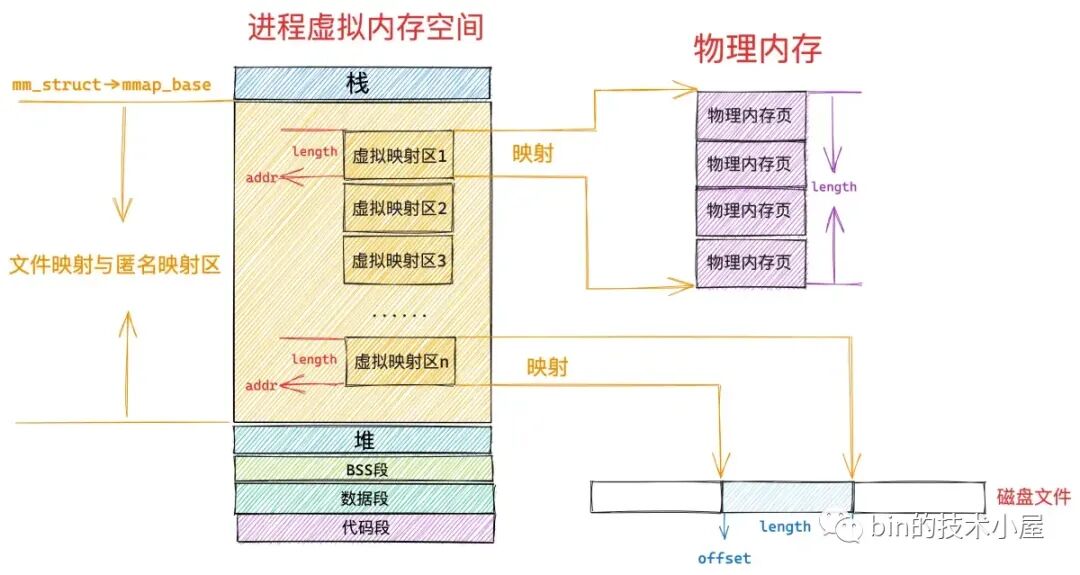
调用 mmap 进行匿名映射的时候(比如进行堆内存的分配),是将进程虚拟内存空间中的某一段虚拟内存区域与物理内存中的匿名内存页进行映射,
调用 mmap 进行文件映射的时候,是将进程虚拟内存空间中的某一段虚拟内存区域与磁盘中某个文件中的某段区域进行映射。

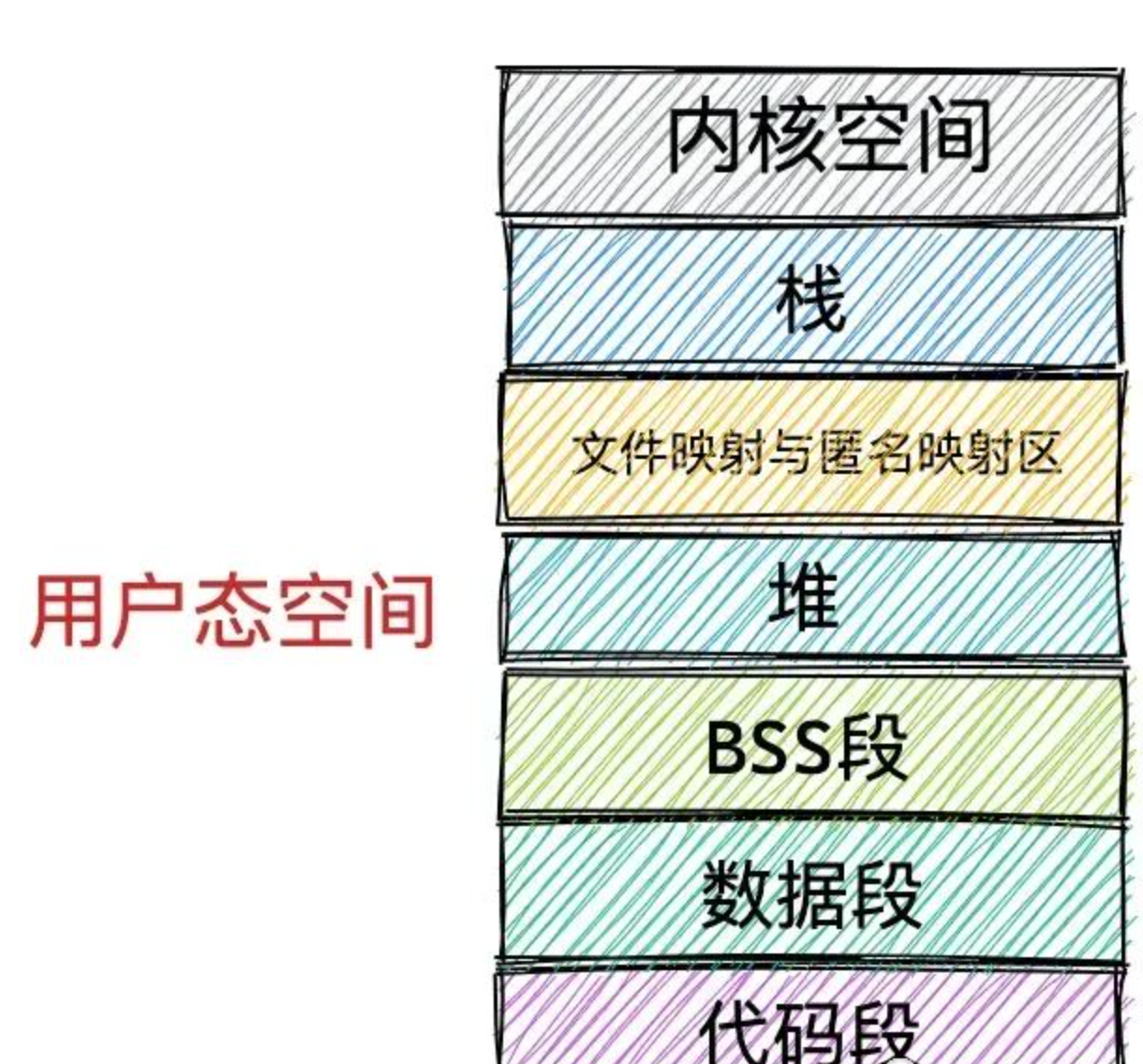
在文件映射与匿名映射这段虚拟内存区域中,包含了一段一段的虚拟映射区,每当我们调用一次 mmap 进行内存映射的时候,内核都会在文件映射与匿名映射区中划分出一段虚拟映射区出来,这段虚拟映射区就是我们申请到的虚拟内存。

mmap 的 前 2 个参数:addr、 length

addr :表示我们要映射的这段虚拟内存区域在进程虚拟内存空间中的起始地址(虚拟内存地址),但是这个参数只是给内核的一个暗示,内核并非一定得从我们指定的 addr 虚拟内存地址上划分虚拟内存区域,内核只不过在划分虚拟内存区域的时候会优先考虑我们指定的 addr,如果这个虚拟地址已经被使用或者是一个无效的地址,那么内核则会自动选取一个合适的地址来划分虚拟内存区域。我们一般会将 addr 设置为 NULL,意思就是完全交由内核来帮我们决定虚拟映射区的起始地址。

length :要申请的这段虚拟内存有多大呢 ?如果是匿名映射,length 参数决定了我们要映射的匿名物理内存有多大,如果是文件映射,length 参数决定了我们要映射的文件区域有多大。

addr,length 必须要按照 PAGE_SIZE(4K) 对齐。

如果我们通过 mmap 映射的是磁盘上的一个文件,那么就需要通过参数 fd 来指定要映射文件的描述符(file descriptor),通过参数 offset 来指定文件映射区域在文件中偏移。

在内存管理系统中,物理内存是按照内存页为单位组织的;
在文件系统中,磁盘中的文件是按照磁盘块为单位组织的。

内存页和磁盘块大小一般情况下都是 4K 大小,所以这里的 offset 也必须是按照 4K 对齐的。

虚拟映射对象的结构体

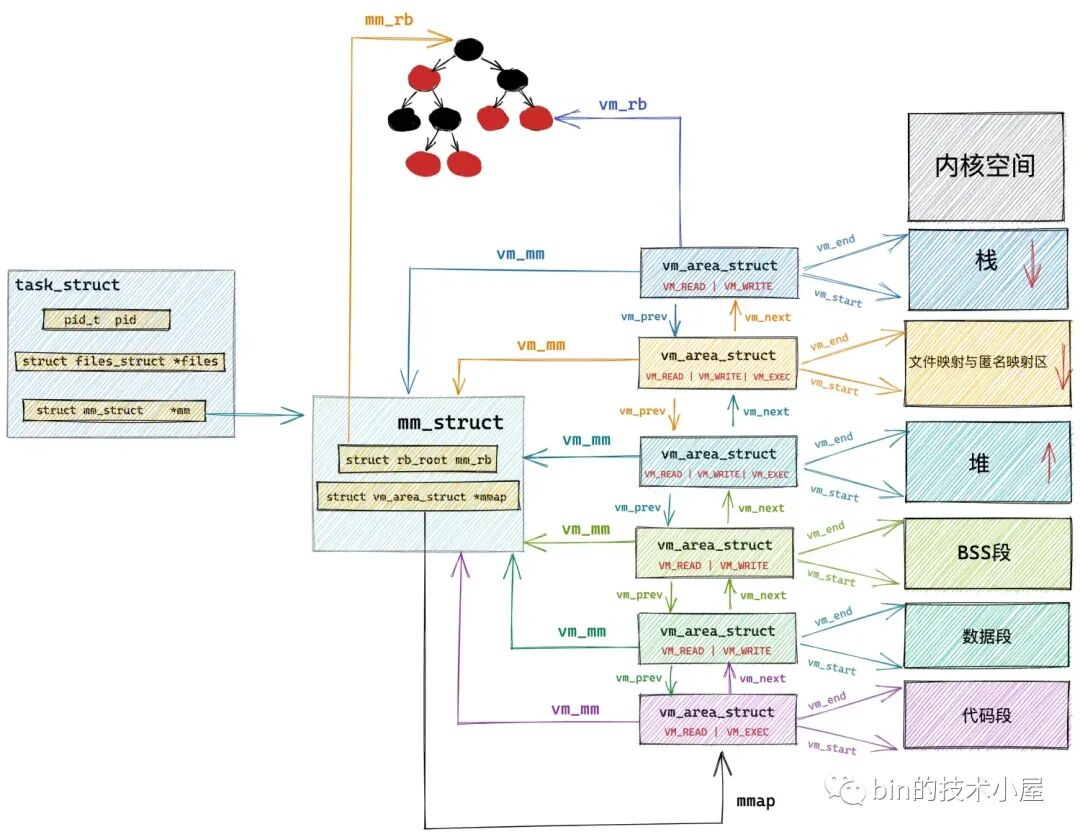
而在文件映射与匿名映射区中的这一段一段的虚拟映射区,其实本质上也是虚拟内存区域,它们和进程虚拟内存空间中的代码段,数据段,BSS 段,堆,栈没有任何区别,
在内核中都是 struct vm_area_struct 结构来表示的,下面我们把进程空间中的这些虚拟内存区域统称为 VMA。

进程虚拟内存空间中的所有 VMA 在内核中有两种组织形式:一种是双向链表,用于高效的遍历进程 VMA,这个 VMA 双向链表是有顺序的,所有 VMA 节点在双向链表中的排列顺序是按照虚拟内存低地址到高地址进行的。

另一种则是用红黑树进行组织,用于在进程空间中高效的查找 VMA,因为在进程虚拟内存空间中不仅仅是只有代码段,数据段,BSS 段,堆,栈这些虚拟内存区域 VMA,尤其是在数据密集型应用进程中,文件映射与匿名映射区里也会包含有大量的 VMA,进程的各种动态链接库所映射的虚拟内存在这里,进程运行过程中进行的匿名映射,文件映射所需要的虚拟内存也在这里。而内核需要频繁地对进程虚拟内存空间中的这些众多 VMA 进行增,删,改,查。所以需要这么一个红黑树结构,方便内核进行高效的查找。

1
2
3
4
5
6
7
8
9
10
11
12
13
14
15
// 进程虚拟内存空间描述符
struct mm_struct {
    // 串联组织进程空间中所有的 VMA  的双向链表 
    struct vm_area_struct *mmap;  /* list of VMAs */
    // 管理进程空间中所有 VMA 的红黑树
    struct rb_root mm_rb;
}

// 虚拟内存区域描述符
struct vm_area_struct {
    // vma 在 mm_struct->mmap 双向链表中的前驱节点和后继节点
    struct vm_area_struct *vm_next, *vm_prev;
    // vma 在 mm_struct->mm_rb 红黑树中的节点
    struct rb_node vm_rb;
}

内核代码

mmap() 库调用由 libc 实现,它将字节偏移量转换为页面偏移量,然后调用 mmap_pgoff() 系统调用。mmap_opgoff() 系统调用获取与文件描述符参数对应的 struct file *,并调用 vm_mmap_pgoff()。

gdb 调试

1
2
3
4
5
6
7
8
9
10
11
12
13
14
15
16
17
[INFO] filename: TA2601.csv.xz
[New Thread 0x7ffff77ff640 (LWP 1376157)]
[Thread 0x7ffff77ff640 (LWP 1376157) exited]
[New Thread 0x7ffff77ff640 (LWP 1376167)]
[Thread 0x7ffff77ff640 (LWP 1376167) exited]
[New Thread 0x7ffff77ff640 (LWP 1376168)]
[Thread 0x7ffff77ff640 (LWP 1376168) exited]
[New Thread 0x7ffff77ff640 (LWP 1376169)]
[Thread 0x7ffff77ff640 (LWP 1376169) exited]
[New Thread 0x7ffff77ff640 (LWP 1376177)]
[Thread 0x7ffff77ff640 (LWP 1376177) exited]
[New Thread 0x7ffff77ff640 (LWP 1376178)]
terminate called after throwing an instance of 'std::error_code'

Thread 7 "cmpmd5xz_O0" received signal SIGABRT, Aborted.
[Switching to Thread 0x7ffff77ff640 (LWP 1376178)]
0x00007ffff788bedc in __pthread_kill_implementation () from /lib64/libc.so.6
1
2
3
4
5
6
7
8
9
10
11
12
13
14
15
16
17
18
19
20
21
22
23
24
25
26
27
28
29
30
31
32
33
34
35
36
37
38
39
40
41
42
43
44
45
46
47
48
49
50
51
52
53
54
55
56
57
58
59
60
61
62
63
64
65
66
67
68
69
(gdb) thread apply all bt full

Thread 7 (Thread 0x7ffff77ff640 (LWP 1376178) "cmpmd5xz_O0"):
#0 0x00007ffff788bedc in __pthread_kill_implementation () from /lib64/libc.so.6
No symbol table info available.
#1 0x00007ffff783eb46 in raise () from /lib64/libc.so.6
No symbol table info available.
#2 0x00007ffff7828833 in abort () from /lib64/libc.so.6
No symbol table info available.
#3 0x00007ffff7cb2e64 in __gnu_cxx::__verbose_terminate_handler () at ../../../../libstdc++-v3/libsupc++/vterminate.cc:95
terminating = true
t = <optimized out>
#4 0x00007ffff7cc505a in __cxxabiv1::__terminate (handler=<optimized out>) at ../../../../libstdc++-v3/libsupc++/eh_terminate.cc:48
No locals.
#5 0x00007ffff7cb29ee in std::terminate () at ../../../../libstdc++-v3/libsupc++/eh_terminate.cc:58
No locals.
#6 0x00007ffff7cc52f8 in __cxxabiv1::__cxa_throw (obj=<optimized out>, tinfo=0x5555555c44b0 <typeinfo for std::error_code>, dest=0x0) at ../../../../libstdc++-v3/libsupc++/eh_throw.cc:98
globals = <optimized out>
header = 0x7ffff296ece0
#7 0x0000555555563b1c in csv::internals::MmapParser::next(unsigned long) [clone .cold] ()
No symbol table info available.
#8 0x0000555555595976 in csv::CSVReader::read_csv(unsigned long) ()
No symbol table info available.
#9 0x00007ffff7cf2ea4 in std::execute_native_thread_routine (__p=0x55555591ad20) at ../../../../../libstdc++-v3/src/c++11/thread.cc:104
__t = <optimized out>
#10 0x00007ffff788a19a in start_thread () from /lib64/libc.so.6
No symbol table info available.
#11 0x00007ffff790f240 in clone3 () from /lib64/libc.so.6
No symbol table info available.

Thread 1 (Thread 0x7ffff7e8a740 (LWP 1376141) "cmpmd5xz_O0"):
#0 0x00007ffff78976c9 in _int_free () from /lib64/libc.so.6
No symbol table info available.
#1 0x00007ffff789a2c5 in free () from /lib64/libc.so.6
No symbol table info available.
#2 0x00005555555a1d7a in std::_Sp_counted_ptr_inplace<csv::internals::RawCSVData, std::allocator<void>, (__gnu_cxx::_Lock_policy)2>::_M_dispose() ()
No symbol table info available.
#3 0x0000555555596315 in csv::CSVReader::read_row(csv::CSVRow&) ()
No symbol table info available.
#4 0x000055555559a5b1 in csv::CSVReader::iterator::operator++() ()
No symbol table info available.
#5 0x0000555555565e4c in main (argc=3, argv=0x7fffffffcee8) at cmp_md5_xz.cpp:198
row = @0x7fffffffb688: {data = {<std::__shared_ptr<csv::internals::RawCSVData, (__gnu_cxx::_Lock_policy)2>> = {<std::__shared_ptr_access<csv::internals::RawCSVData, (__gnu_cxx::_Lock_policy)2, false, false>> = {<No data fields>}, _M_ptr = 0x7ffff296e240, _M_refcount = {_M_pi = 0x7ffff296e230}}, <No data fields>}, data_start = 9999776, fields_start = 1972448, row_length = 32}
__for_range = @0x7fffffffb7f0: {_format = {possible_delimiters = {<std::_Vector_base<char, std::allocator<char> >> = {_M_impl = {<std::allocator<char>> = {<std::__new_allocator<char>> = {<No data fields>}, <No data fields>}, <std::_Vector_base<char, std::allocator<char> >::_Vector_impl_data> = {_M_start = 0x5555555e0ac0 ",|\t;^U", _M_finish = 0x5555555e0ac1 "|\t;^U", _M_end_of_storage = 0x5555555e0ac5 "U"}, <No data fields>}}, <No data fields>}, trim_chars = {<std::_Vector_base<char, std::allocator<char> >> = {_M_impl = {<std::allocator<char>> = {<std::__new_allocator<char>> = {<No data fields>}, <No data fields>}, <std::_Vector_base<char, std::allocator<char> >::_Vector_impl_data> = {_M_start = 0x0, _M_finish = 0x0, _M_end_of_storage = 0x0}, <No data fields>}}, <No data fields>}, header = 0, no_quote = false, quote_char = 34 '"', col_names = {<std::_Vector_base<std::__cxx11::basic_string<char, std::char_traits<char>, std::allocator<char> >, std::allocator<std::__cxx11::basic_string<char, std::char_traits<char>, std::allocator<char> > > >> = {_M_impl = {<std::allocator<std::__cxx11::basic_string<char, std::char_traits<char>, std::allocator<char> > >> = {<std::__new_allocator<std::__cxx11::basic_string<char, std::char_traits<char>, std::allocator<char> > >> = {<No data fields>}, <No data fields>}, <std::_Vector_base<std::__cxx11::basic_string<char, std::char_traits<char>, std::allocator<char> >, std::allocator
<std::__cxx11::basic_string<char, std::char_traits<char>, std::allocator<char> > > >::_Vector_impl_data> = {_M_start = 0x0, _M_finish = 0x0, _M_end_of_storage = 0x0}, <No data fields>}}, <No data fields>}, variable_column_policy = csv::VariableColumnPolicy::IGNORE_ROW}, col_names = {<std::__shared_ptr<csv::internals::ColNames, (__gnu_cxx::_Lock_policy)2>> = {<std::__shared_ptr_access<csv::internals::ColNames, (__gnu_cxx::_Lock_policy)2, false, false>> = {<No data fields>}, _M_ptr = 0x5555555d87b0, _M_refcount = {_M_pi = 0x5555555d87a0}}, <No data fields>}, parser = {_M_t = {<std::__uniq_ptr_impl<csv::internals::IBasicCSVParser, std::default_delete<csv::internals::IBasicCSVParser> >> = {_M_t = {<std::_Tuple_impl<0, csv::internals::IBasicCSVParser*, std::default_delete<csv::internals::IBasicCSVParser> >> = {<std::_Tuple_impl<1, std::default_delete<csv::internals::IBasicCSVParser> >> = {<std::_Head_base<1, std::default_delete<csv::internals::IBasicCSVParser>, true>> = {_M_head_impl = {<No data fields>}}, <No data fields>}, <std::_Head_base<0, csv::internals::IBasicCSVParser*, false>> = {_M_head_impl = 0x5555564b4e80}, <No data fields>}, <No data fields>}}, <No data fields>}}, records = {_M_t = {<std::__uniq_ptr_impl<csv::internals::ThreadSafeDeque<csv::CSVRow>, std::default_delete<csv::internals::ThreadSafeDeque<csv::CSVRow> > >> = {_M_t = {<std::_Tuple_impl<0, csv::internals::ThreadSafeDeque<csv::CSVRow>*, std::default_delete<csv::internals::ThreadSafeDeque<csv::CSVRow> > >> = {<std::_Tuple_impl<1, std::default_delete<csv::internals::ThreadSafeDeque<csv::CSVRow> > >> = {<std::_Head_base<1, std::default_delete<csv::internals::ThreadSafeDeque<csv::CSVRow> >, true>> = {_M_head_impl = {<No data fields>}}, <No data fields>}, <std::_Head_base<0, csv::internals::ThreadSafeDeque<csv::CSVRow>*, false>> = {_M_head_impl = 0x5555555e00e0}, <No data fields>}, <No data fields>}}, <No data fields>}}, n_cols = 32, _n_rows = 61639, header_trimmed = true, read_csv_worker = {_M_id = {_M_thread = 140737345746496}}}
__for_begin = {daddy = 0x7fffffffb7f0, row = {data = {<std::__shared_ptr<csv::internals::RawCSVData, (__gnu_cxx:
:_Lock_policy)2>> = {<std::__shared_ptr_access<csv::internals::RawCSVData, (__gnu_cxx::_Lock_policy)2, false, false>> = {<No data fields>}, _M_ptr = 0x7ffff296e240, _M_refcount = {_M_pi = 0x7ffff296e230}}, <No data fields>}, data_start = 9999776, fields_start = 1972448, row_length = 32}, i = 0}
__for_end = {daddy = 0x0, row = {data = {<std::__shared_ptr<csv::internals::RawCSVData, (__gnu_cxx::_Lock_policy)2>> = {<std::__shared_ptr_access<csv::internals::RawCSVData, (__gnu_cxx::_Lock_policy)2, false, false>> = {<No data fields>}, _M_ptr = 0x0, _M_refcount = {_M_pi = 0x0}}, <No data fields>}, data_start = 0, fields_start = 0, row_length = 0}, i = 0}
line_number = 0
tmd = {_M_t = {_M_impl = {<std::allocator<std::_Rb_tree_node<std::pair<long const, MarketDataDepth5> > >> = {<std::__new_allocator<std::_Rb_tree_node<std::pair<long const, MarketDataDepth5> > >> = {<No data fields>}, <No data fields>}, <std::_Rb_tree_key_compare<std::less<long> >> = {_M_key_compare = {<std::binary_function<long, long, bool>> = {<No data fields>}, <No data fields>}}, <std::_Rb_tree_header> = {_M_header = {_M_color = std::_S_red, _M_parent = 0x555555769380, _M_left = 0x5555555db2a0, _M_right = 0x555556437c70}, _M_node_count = 78287}, <No data fields>}}}
bmd = {_M_t = {_M_impl = {<std::allocator<std::_Rb_tree_node<std::pair<long const, MarketDataDepth5> > >> = {<std::__new_allocator<std::_Rb_tree_node<std::pair<long const, MarketDataDepth5> > >> = {<No data fields>}, <No data fields>}, <std::_Rb_tree_key_compare<std::less<long> >> = {_M_key_compare = {<std::binary_function<long, long, bool>> = {<No data fields>}, <No data fields>}}, <std::_Rb_tree_header> = {_M_header = {_M_color = std::_S_red, _M_parent = 0x55555673b310, _M_left = 0x5555564b5450, _M_right = 0x555556f83590}, _M_node_count = 61614}, <No data fields>}}}
bfs = {<std::basic_istream<char, std::char_traits<char> >> = {<std::basic_ios<char, std::char_traits<char> >> = {<std::ios_base> = {_vptr.ios_base = 0x7ffff7e76dc8 <vtable for std::basic_ifstream<char, std::char_traits<char> >+64>, static boolalpha = std::_S_boolalpha, static dec = std::_S_dec, static fixed = std::_S_fixed, static hex = std::_S_hex, static internal = std::_S_internal, static left = std::_S_left, static oct = std::_S_oct, static right = std::_S_right, static scientific = std::_S_scientific, static showbase = std::_S_showbase, static showpoint = std::_S_showpoint, static showpos = std::_S_showpos, static skipws = std::_S_skipws, static unitbuf = std::_S_unitbuf, static uppercase = std::_S_uppercase, static adjustfield = std::_S_adjustfield, static basefield = std::_S_basefield, static floatfield = std::_S_floatfield, static badbit = std::_S_badbit, static eofbit = std::_S_eofbit, static failbit = std::_S_failbit, static goodbit = std::_S_goodbit, static app = std::_S_app, static ate = std::_S_ate, static binary = std::_S_bin, static in = std::_S_in, static out = std::_S_out, static trunc = std::_S_trunc, static __noreplace = std::_S_noreplace, static beg = std::_S_beg, static cur = std::_S_cur, static end = std::_S_end, _M_precision = 6, _M_width = 0, _M_flags = 4098, _M_exception = std::_S_goodbit, _M_streambuf_state = std::_S_goodbit, _M_callbacks = 0x0, _M_word_zero = {_M_pword = 0x0, _M_iword = 0}, _M_local_word = {{_M_pword = 0x0, _M_iword = 0}, {_M_pword = 0x0, _M_iword = 0}, {_M_pword = 0x0, _M_iword = 0}, {_M_pword = 0x0, _M_iword = 0}, {_M_pword = 0x0, _M_iword = 0}, {_M_pword = 0x0, _M_iword = 0}, {_M_pword = 0x0, _M_iword = 0}, {_M_pword = 0x0, _M_iword = 0}}, _M_word_size = 8, _M_word = 0x7fffffffbd10, _M_ios_locale = {static none = 0, static ctype = 1, static numeric = 2, static collate = 4, static time = 8, static monetary = 16, static messages = 32, static all = 63, _M_impl = 0x7ffff7e80080 <(anonymous namespace)::c_locale_impl>}}, _M_tie = 0x0, _M_fill = 32 ' ', _M_fill_init = true, _M_streambuf = 0x7fffffffbbe0, _M_ctype = 0x7ffff7e7faa0 <(anonymous namespace)::ctype_c>, _M_num_put = 0x7ffff7e7fa30 <(anonymous namespace)::num_put_c>, _M_num_get = 0x7ffff7e7fa40 <(anonymous namespace)::num_get_c>}, _vptr.basic_istream = 0x7ffff7e76da0 <vtable for std::basic_ifstream<char, std::char_traits<char> >+24>, _M_gcount = 0}, _M_filebuf = {<std::basic_streambuf<char, std::char_traits<char> >> = {_vptr.basic_streambuf = 0x7ffff7e76ca8 <vtable for std::basic_filebuf<char, std::char_traits<char> >+16>, _M_in_beg = 0x555556437d30 "θ,\023V(\037\220X\267m#\323\322\326Z\317oUJ\262fٜ\254>;P*\267\263\003\303\322\030\226\226\276\005U\247i\257)\230\001/\037\314G8\314\342\201:>\0275\357ɐ\220\3269\253\207ld\223>\027\251s5\004߰\001\355\342=\\\264S\026\350v&\034\231<\243E\335\r'^\266M[\341\334O\242n\233N\bF\3634!\243J\3338\025`\304ɀ\260\314Ĭ\277.\343E\365xI[0\243\355ޔ\375\021Y\017\223\257\222\271\rf", _M_in_cur = 0x555556437d30 "θ,\023V(\037\220X\267m#\323\322\326Z\317oUJ\262fٜ\254>;P*\267\263\003\303\322\030\226\226\276\005U\247i\257)\230\001/\037\314G8\314\342\201:>\0275\357ɐ\220\3269\253\207ld\223>\027\251s5\004߰\001\355\342=\\\264S\026\350v&\034\231<\243E\335\r'^\266M[\341\334O\242n\233N\bF\3634!\243J\3338\025`\304ɀ\260\314Ĭ\277.\343E\365xI[0\243\355ޔ\375\021Y\017\223\257\222\271\rf", _M_in_end = 0x555556437d30 "θ,\023V(\037\220X\267m#\323\322\326Z\317oUJ\262fٜ\254>;P*\267\263\003\303\322\030\226\226\276\005U\247i\257)\230\001/\037\314G8\314\342\201:>\0275\357ɐ\220\3269\253\207ld\223>\027\251s5\004߰\001\355\342=\\\264S\026\350v&\034\231<\243E\335\r'^\266M[\341\334O\242n\233N\bF\3634!\243J\3338\025`\304ɀ\260\314Ĭ\277.\343E\365xI[0\243\355ޔ\375\021Y\017\223\257\222\271\rf", _M_out_beg = 0x0, _M_out_cur = 0x0, _M_out_end = 0x0, _M_buf_locale = {static none = 0, static ctype = 1, static numeric = 2, static collate = 4, static time = 8, static monetary = 16, static messages = 32, static all = 63, _M_impl = 0x7ffff7e80080 <(anonymous namespace)::c_locale_impl>}}, _M_lock = {__data = {__lock = 0, __count = 0, __owner = 0, __nusers = 0, __kind = 0, __spins = 0, __elision = 0, __list = {__prev = 0x0, __next = 0x0}}, __size = '\000' <repeats 39 times>, __align = 0}, _M_file = {_M_cfile = 0x7ffff2fefbc0, _M_cfile_created = true}, _M_mode = 12, _M_state_beg = {__count = 0, __value = {__wch = 0, __wchb = "\000\000\000"}}, _M_state_cur = {__count = 0, __value = {__wch = 0, __wchb = "\000\000\000"}}, _M_state_last = {__count = 0, __value = {__wch = 0, __wchb = "\000\000\000"}}, _M_buf = 0x555556437d30 "θ,\023V(\037\220X\267m#\323\322\326Z\317oUJ\262fٜ\254>;P*\267\263\003\303\322\030\226\226\276\005U\247i\257)\230\001/\037\314G8\314\342\201:>\0275\357ɐ\220\3269\253\207ld\223>\027\251s5\004߰\001\355\342=\\\264S\026\350v&\034\231<\243E\335\r'^\266M[\341\334O\242n\233N\bF\3634!\243J\3338\025`\304ɀ\260\314Ĭ\277.\343E\365xI[0\243\355ޔ\375\021Y\017\223\257\222\271\rf", _M_buf_size = 8192, _M_buf_allocated = true, _M_reading = false, _M_writing = false, _M_pback = 0 '\000', _M_pback_cur_save = 0x0, _M_pback_end_save = 0x0, _M_pback_init = false, _M_codecvt = 0x7ffff7e7fa10 <(anonymous namespace)::codecvt_c>, _M_ext_buf = 0x0, _M_ext_buf_size = 0, _M_ext_next = 0x0, _M_ext_end = 0x0}}
bin = {<boost::iostreams::detail::filtering_stream_base<boost::iostreams::chain<boost::iostreams::input, char, std::char_traits<char>, std::allocator<char> >, boost::iostreams::public_>> = {<boost::iostreams::access_control<boost::iostreams::detail::chain_client<boost::iostreams::chain<boost::iostreams::input, char, std::char_traits<char>, std::allocator<char> > >, boost::iostreams::public_, boost::iostreams::detail::pub_<boost::iostreams::detail::chain_client<boost::iostreams::chain<boost::iostreams::input, char, std::char_traits<char>, std::allocator<char> > > > >> = {<boost::iostreams::detail::pub_<boost::iostreams::detail::chain_client<boost::iostreams::chain<boost::iostreams::input, char, std::char_traits<char>, std::allocator<char> > > >> = {<boost::iostreams::detail::chain_client<boost::iostreams::chain<boost::iostreams::input, char, std::char_traits<char>, std::allocator<char> > >> = {_vptr.chain_client = 0x5555555c3760 <vtable for boost::iostreams::filtering_stream<boost::iostreams::input, char, std::char_traits<char>, std::allocator<char>, boost::iostreams::public_>+24>, chain_ = 0x7fffffffb8b0}, <No data fields>}, <No data fields>}, <std::basic_istream<char, std::char_traits<char> >> = {<std::basic_ios<char, std::char_traits<char> >> = {<std::ios_base> = {_vptr.ios_base = 0x5555555c37b8 <vtable for boost::iostreams::filtering_stream<boost::iostreams::input, char, std::char_traits<char>, std::allocator<char>, boost::iostreams::public_>+112>, static boolalpha = std::_S_boolalpha, static dec = std::_S_dec, static fixed = std::_S_fixed, static hex = std::_S_hex, static internal = std::_S_internal, static left = std::_S_left, static oct = std::_S_oct, static right = std::_S_right, static scientific = std::_S_scientific, static showbase = std::_S_showbase, static showpoint = std::_S_showpoint, static showpos = std::_S_showpos, static skipws = std::_S_skipws, static unitbuf = std::_S_unitbuf, static uppercase = std::_S_uppercase, static adjustfield = std::_S_adjustfield, static basefield = std::_S_basefield, static floatfield = std::_S_floatfield, static badbit = std::_S_badbit, static eofbit = std::_S_eofbit, static failbit = std::_S_failbit, static goodbit = std::_S_goodbit, static app = std::_S_app, static ate = std::_S_ate, static binary = std::_S_bin, static in = std::_S_in, static out = std::_S_out, static trunc = std::_S_trunc, static __noreplace = std::_S_noreplace, static beg = std::_S_beg, static cur = std::_S_cur, static end = std::_S_end, _M_precision = 6, _M_width = 0, _M_flags = 4098, _M_exception = std::_S_goodbit, _M_streambuf_state = std::_S_goodbit, _M_callbacks = 0x0, _M_word_zero = {_M_pword = 0x0, _M_iword = 0}, _M_local_word = {{_M_pword = 0x0, _M_iword = 0}, {_M_pword = 0x0, _M_iword = 0}, {_M_pword = 0x0, _M_iword = 0}, {_M_pword = 0x0, _M_iword = 0}, {_M_pword = 0x0, _M_iword = 0}, {_M_pword = 0x0, _M_iword = 0}, {_M_pword = 0x0, _M_iword = 0}, {_M_pword = 0x0, _M_iword = 0}}, _M_word_size = 8, _M_word = 0x7fffffffb900, _M_ios_locale = {static none = 0, static ctype = 1, static numeric = 2, static collate = 4, static time = 8, static monetary = 16, static messages = 32, static all = 63, _M_impl = 0x7ffff7e80080 <(anonymous namespace)::c_locale_impl>}}, _M_tie = 0x0, _M_fill = 32 ' ', _M_fill_init = true, _M_streambuf = 0x5555555db450, _M_ctype = 0x7ffff7e7faa0 <(anonymous namespace)::ctype_c>, _M_num_put = 0x7ffff7e7fa30 <(anonymous namespace)::num_put_c>, _M_num_get = 0x7ffff7e7fa40 <(anonymous namespace)::num_get_c>}, _vptr.basic_istream = 0x5555555c3790 <vtable for boost::iostreams::filtering_stream<boost::iostreams::input, char, std::char_traits<char>, std::allocator<char>, boost::iostreams::public_>+72>, _M_gcount = 0}, chain_ = {<boost::iostreams::detail::chain_base<boost::iostreams::chain<boost::iostreams::input, char, std::char_traits<char>, std::allocator<char> >, char, std::char_traits<char>, std::allocator<char>, boost::iostreams::input>> = {pimpl_ = {px = 0x7ffff00ff8d0, pn = {pi_ = 0x5555555dcbd0}}}, <No data fields>}}, <No data fields>}
bof = {<std::basic_ostream<char, std::char_traits<char> >> = {<std::basic_ios<char, std::char_traits<char> >> = {<std::ios_base> = {_vptr.ios_base = 0x7ffff7e76e88 <vtable for std::basic_ofstream<char, std::char_traits<char> >+64>, static boolalpha = std::_S_boolalpha, static dec = std::_S_dec, static fixed = std::_S_fixed, static hex = std::_S_hex, static internal = std::_S_internal, static left = std::_S_left, static oct = std::_S_oct, static right = std::_S_right, static scientific = std::_S_scientific, static showbase = std::_S_showbase, static showpoint = std::_S_showpoint, static showpos = std::_S_showpos, static skipws = std::_S_skipws, static unitbuf = std::_S_unitbuf, static uppercase = std::_S_uppercase, static adjustfield = std::_S_adjustfield, static basefield = std::_S_basefield, static floatfield = std::_S_floatfield, static badbit = std::_S_badbit, static eofbit = std::_S_eofbit, static failbit = std::_S_failbit, static goodbit = std::_S_goodbit, static app = std::_S_app, static ate = std::_S_ate, static binary = std::_S_bin, static in = std::_S_in, static out = std::_S_out, static trunc = std::_S_trunc, static __noreplace = std::_S_noreplace, static beg = std::_S_beg, static cur = std::_S_cur, static end = std::_S_end, _M_precision = 6, _M_width = 0, _M_flags = 4098, _M_exception = std::_S_goodbit, _M_streambuf_state = std::_S_failbit, _M_callbacks = 0x0, _M_word_zero = {_M_pword = 0x0, _M_iword = 0}, _M_local_word = {{_M_pword = 0x0, _M_iword = 0}, {_M_pword = 0x0, _M_iword = 0}, {_M_pword = 0x0, _M_iword = 0}, {_M_pword = 0x0, _M_iword = 0}, {_M_pword = 0x0, _M_iword = 0}, {_M_pword = 0x0, _M_iword = 0}, {_M_pword = 0x0, _M_iword = 0}, {_M_pword = 0x0, _M_iword = 0}}, _M_word_size = 8, _M_word = 0x7fffffffbb08, _M_ios_locale = {static none = 0, static ctype = 1, static numeric = 2, static collate = 4, static time = 8, static monetary = 16, static messages = 32, static all = 63, _M_impl = 0x7ffff7e80080 <(anonymous namespace)::c_locale_impl>}}, _M_tie = 0x0, _M_fill = 32 ' ', _M_fill_init = true, _M_streambuf = 0x7fffffffb9d8, _M_ctype = 0x7ffff7e7faa0 <(anonymous namespace)::ctype_c>, _M_num_put = 0x7ffff7e7fa30 <(anonymous namespace)::num_put_c>, _M_num_get = 0x7ffff7e7fa40 <(anonymous namespace)::num_get_c>}, _vptr.basic_ostream = 0x7ffff7e76e60 <vtable for std::basic_ofstream<char, std::char_traits<char> >+24>}, _M_filebuf = {<std::basic_streambuf<char, std::char_traits<char> >> = {_vptr.basic_streambuf = 0x7ffff7e76ca8 <vtable for std::basic_filebuf<char, std::char_traits<char> >+16>, _M_in_beg = 0x0, _M_in_cur = 0x0, _M_in_end = 0x0, _M_out_beg = 0x0, _M_out_cur = 0x0, _M_out_end = 0x0, _M_buf_locale = {static none = 0, static ctype = 1, static numeric = 2, static collate = 4, static time = 8, static monetary = 16, static messages = 32, static all = 63, _M_impl = 0x7ffff7e80080 <(anonymous namespace)::c_locale_impl>}}, _M_lock = {__data = {__lock = 0, __count = 0, __owner = 0, __nusers = 0, __kind = 0, __spins = 0, __elision = 0, __list = {__prev = 0x0, __next = 0x0}}, __size = '\000' <repeats 39 times>, __align = 0}, _M_file = {_M_cfile = 0x0, _M_cfile_created = true}, _M_mode = 0, _M_state_beg = {__count = 0, __value = {__wch = 0, __wchb = "\000\000\000"}}, _M_state_cur = {__count = 0, __value = {__wch = 0, __wchb = "\000\000\000"}}, _M_state_last = {__count = 0, __value = {__wch = 0, __wchb = "\000\000\000"}}, _M_buf = 0x0, _M_buf_size = 8192, _M_buf_allocated = false, _M_reading = false, _M_writing = false, _M_pback = 0 '\000', _M_pback_cur_save = 0x0, _M_pback_end_save = 0x0, _M_pback_init = false, _M_codecvt = 0x7ffff7e7fa10 <(anonymous namespace)::codecvt_c>, _M_ext_buf = 0x0, _M_ext_buf_size = 0, _M_ext_next = 0x0, _M_ext_end = 0x0}}
tstpath = {static preferred_separator = 47 '/', _M_pathname = {_M_dataplus = {<std::allocator<char>> = {<std::__new_allocator<char>> = {<No data fields>}, <No data fields>}, _M_p = 0x5555555e0f90 "/home/fdata/raw/tick/CZCE/depth5/20250821/TA2601.csv.xz"}, _M_string_length = 55, {_M_local_buf = "T", '\000' <repeats 14 times>, _M_allocated_capacity = 84}}, _M_cmpts = {_M_impl = {_M_t = {<std::__uniq_ptr_impl<std::filesystem::__cxx11::path::_List::_Impl, std::filesystem::__cxx11::path::_List::_Impl_deleter>> = {_M_t = {<std::_Tuple_impl<0, std::filesystem::__cxx11::path::_List::_Impl*, std::filesystem::__cxx11::path::_List::_Impl_deleter>> = {<std::_Tuple_impl<1, std::filesystem::__cxx11::path::_List::_Impl_deleter>> = {<std::_Head_base<1, std::filesystem::__cxx11::path::_List::_Impl_deleter, true>> = {_M_head_impl = {<No data fields>}}, <No data fields>}, <std::_Head_base<0, std::filesystem::__cxx11::path::_List::_Impl*, false>> = {_M_head_impl = 0x5555555e0ff0}, <No data fields>}, <No data fields>}}, <No data fields>}}}}
benpath = {static preferred_separator = 47 '/', _M_pathname = {_M_dataplus = {<std::allocator<char>> = {<std::__new_allocator<char>> = {<No data fields>}, <No data fields>}, _M_p = 0x5555555d8f10 "/home/fdata/raw/tick/MDC/depth5/20250821/TA2601.csv.xz"}, _M_string_length = 54, {_M_local_buf = "R", '\000' <repeats 14 times>, _M_allocated_capacity = 82}}, _M_cmpts = {_M_impl = {_M_t = {<std::__uniq_ptr_impl<std::filesystem::__cxx11::path::_List::_Impl, std::filesystem::__cxx11::path::_List::_Impl_deleter>> = {_M_t = {<std::_Tuple_impl<0, std::filesystem::__cxx11::path::_List::_Impl*, std::filesystem::__cxx11::path::_List::_Impl_deleter>> = {<std::_Tuple_impl<1, std::filesystem::__cxx11::path::_List::_Impl_deleter>> = {<std::_Head_base<1, std::filesystem::__cxx11::path::_List::_Impl_deleter, true>> = {_M_head_impl = {<No data fields>}}, <No data fields>}, <std::_Head_base<0, std::filesystem::__cxx11::path::_List::_Impl*, false>> = {_M_head_impl = 0x5555555d8f70}, <No data fields>}, <No data fields>}}, <No data fields>}}}}
f = @0x5555555e4c30: {_M_dataplus = {<std::allocator<char>> = {<std::__new_allocator<char>> = {<No data fields>}, <No data fields>}, _M_p = 0x5555555e4c40 "TA2601.csv.xz"}, _M_string_length = 13, {_M_local_buf = "TA2601.csv.xz\000\000", _M_allocated_capacity = 7146703741821010260}}
__for_range = @0x7fffffffb5f0: {_M_t = {_M_impl = {<std::allocator<std::_Rb_tree_node<std::__cxx11::basic_string<char, std::char_traits<char>, std::allocator<char> > > >> = {<std::__new_allocator<std::_Rb_tree_node<std::__cxx11::basic_string<char, std::char_traits<char>, std::allocator<char> > > >> = {<No data fields>}, <No data fields>}, <std::_Rb_tree_key_compare<std::less<std::__cxx11::basic_string<char, std::char_traits<char>, std::allocator<char> > > >> = {_M_key_compare = {<std::binary_function<std::__cxx11::basic_string<char, std::char_traits<char>, std::allocator<char> >, std::__cxx11::basic_string<char, std::char_traits<char>, std::allocator<char> >, bool>> = {<No data fields>}, <No data fields>}}, <std::_Rb_tree_header> = {_M_header = {_M_color = std::_S_red, _M_parent = 0x5555555e1510, _M_left = 0x5555555e5520, _M_right = 0x5555555e4350}, _M_node_count = 241}, <No data fields>}}}
__for_begin = {_M_node = 0x5555555e4c10}
__for_end = {_M_node = 0x7fffffffb5f8}
exchange = {_M_dataplus = {<std::allocator<char>> = {<std::__new_allocator<char>> = {<No data fields>}, <No data fields>}, _M_p = 0x7fffffffbef0 "CZCE"}, _M_string_length = 4, {_M_local_buf = "CZCE\000\000\000\000@d\032\001\000\000\000", _M_allocated_capacity = 1162041923}}
date = {_M_dataplus = {<std::allocator<char>> = {<std::__new_allocator<char>> = {<No data fields>}, <No data fields>}, _M_p = 0x7fffffffbed0 "20250821"}, _M_string_length = 8, {_M_local_buf = "20250821\000\355\372\367\377\177\000", _M_allocated_capacity = 3544957636396068914}}
bendir = {_M_dataplus = {<std::allocator<char>> = {<std::__new_allocator<char>> = {<No data fields>}, <No data fields>}, _M_p = 0x5555555d8650 "/home/fdata/raw/tick/MDC/depth5/20250821/"}, _M_string_length = 41, {_M_local_buf = "P", '\000' <repeats 14 times>, _M_allocated_capacity = 80}}
tstdir = {_M_dataplus = {<std::allocator<char>> = {<std::__new_allocator<char>> = {<No data fields>}, <No data fields>}, _M_p = 0x5555555d86e0 "/home/fdata/raw/tick/CZCE/depth5/20250821/"}, _M_string_length = 42, {_M_local_buf = "<\000\000\000\000\000\000\000p\276\377\377\377\177\000", _M_allocated_capacity = 60}}
mktopen = 20250821090000000
eod = 20250821150000000
son = 20250821210000000
temp_path = {static preferred_separator = 47 '/', _M_pathname = {_M_dataplus = {<std::allocator<char>> = {<std::__new_allocator<char>> = {<No data fields>}, <No data fields>}, _M_p = 0x5555555d8810 "/tmp/tempfile_1759759482756864030"}, _M_string_length = 33, {_M_local_buf = "!\000\000\000\000\000\000\000\000\364\374\367\377\177\000", _M_allocated_capacity = 33}}, _M_cmpts = {_M_impl = {_M_t = {<std::__uniq_ptr_impl<std::filesystem::__cxx11::path::_List::_Impl, std::filesystem::__cxx11::path::_List::_Impl_deleter>> = {_M_t = {<std::_Tuple_impl<0, std::filesystem::__cxx11::path::_List::_Impl*, std::filesystem::__cxx11::path::_List::_Impl_deleter>> = {<std::_Tuple_impl<1, std::filesystem::__cxx11::path::_List::_Impl_deleter>> = {<std::_Head_base<1, std::filesystem::__cxx11::path::_List::_Impl_deleter, true>> = {_M_head_impl = {<No data fields>}}, <No data fields>}, <std::_Head_base<0, std::filesystem::__cxx11::path::_List::_Impl*, false>> = {_M_head_impl = 0x5555555d8840}, <No data fields>}, <No data fields>}}, <No data fields>}}}}
tempfile = {_M_dataplus = {<std::allocator<char>> = {<std::__new_allocator<char>> = {<No data fields>}, <No data fields>}, _M_p = 0x5555555d86b0 "/tmp/tempfile_1759759482756864030"}, _M_string_length = 33, {_M_local_buf = "!\000\000\000\000\000\000\000>)\375\367\377\177\000", _M_allocated_capacity = 33}}

异常路径

basic_csv_parser.cpp

1
2
3
4
5
6
7
8
9
10
11
12
13
14
15
16
17
18
19
20
21
#include <system_error>
// ...
CSV_INLINE void MmapParser::next(size_t bytes = ITERATION_CHUNK_SIZE) {
// Reset parser state
this->field_start = UNINITIALIZED_FIELD;
this->field_length = 0;
this->reset_data_ptr();

// Create memory map
const size_t offset = this->mmap_pos;
const size_t length = std::min(this->source_size - offset, bytes);
std::error_code error;
auto mmap = mio::make_mmap_source(this->_filename, offset, length, error);
if (error) {
std::string msg = "Memory mapping failed during CSV parsing: file='" + this->_filename
+ "' offset=" + std::to_string(offset)
+ " length=" + std::to_string(length);
throw std::system_error(error, msg); // throw exception
}
this->data_ptr->_data = std::make_shared<mio::basic_mmap_source<char>>(std::move(mmap));
this->mmap_pos += length;

``

这个 next 是在 CSVReader 中,开了个 std::thread ,read_csv 函数中 run parsing。